abap software layer aware debugging is a debugging capability in SAP ABAP that enables developers to limit debugging operations to predefined software layers or package hierarchies. It is primarily used to separate customer-developed code from standard SAP framework execution during runtime analysis. In large SAP landscapes with complex enhancement frameworks, this method improves debugging efficiency and reduces diagnostic complexity.
Key Takeaways
- abap software layer aware debugging filters debugging by software component or package layer.
- SLAD improves troubleshooting precision in SAP ABAP systems.
- Layer-aware debugging reduces unnecessary framework navigation.
- SAP developers commonly combine SLAD with runtime analysis and trace tools.
- Debugging and testing serve different but complementary software quality functions.
- Structured debugging techniques improve root cause identification efficiency.
Importance of Debugging in Software Development
Why is abap software layer aware debugging important in SAP systems?
abap software layer aware debugging is important because SAP applications frequently execute multiple framework layers, enhancement spots, and standard classes during a single transaction.
Key advantages include:
- Faster issue isolation in custom developments
- Reduced navigation through standard SAP code
- Better traceability for enhancement implementations
- Lower risk of modifying unrelated framework logic
- Improved productivity during production support
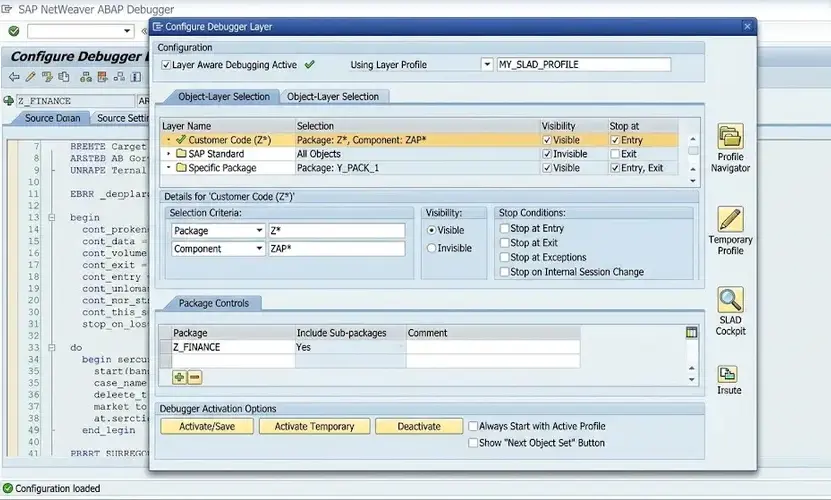
In SAP NetWeaver systems, developers commonly use Software Layer Aware Debugging (SLAD) to focus on:
| Debugging Focus Area | Purpose |
| Customer namespace | Analyze Z/Y custom objects |
| SAP standard layer | Inspect framework behavior |
| Add-on components | Troubleshoot vendor extensions |
| Business packages | Isolate module-specific logic |
This approach is especially useful in:
- SAP S/4HANA migrations
- Enhancement Framework analysis
- BAdI implementation testing
- User-exit troubleshooting
Process Tools & Techniques Used in Debugging During Software Development
How does abap software layer aware debugging work?
abap software layer aware debugging works by assigning breakpoints and runtime analysis rules to specific package layers within the SAP system.
Typical process steps include:
- Open the ABAP debugger
- Activate Layer Aware Debugging (SLAD)
- Select the required software component or package
- Execute the transaction or report
- Debug only the selected application layer
Common SAP debugging tools used with SLAD include:
- New ABAP Debugger
- System Debugging
- Breakpoints and Watchpoints
- Runtime Analysis (SAT)
- SQL Trace (ST05)
- ABAP Test Cockpit (ATC)
A related area often discussed alongside this topic includes ABAP runtime analysis, SAP enhancement debugging, BAdI troubleshooting, and user-exit debugging.
Software Debugging Techniques
What debugging techniques are commonly used with abap software layer aware debugging?
abap software layer aware debugging is frequently combined with structured debugging techniques to improve fault detection accuracy.
Common techniques include:
1. Breakpoint Debugging
Developers pause execution at predefined logic points to inspect variables and call stacks.
2. Watchpoint Analysis
Specific variable changes trigger debugger execution automatically.
3. Layer Filtering
Only selected software layers are debugged while unrelated framework calls are skipped.
4. Call Stack Inspection
Developers analyze execution sequences across classes, methods, and function modules.
5. Runtime Trace Analysis
Performance-intensive transactions are analyzed for bottlenecks.
| Technique | Primary Use |
| Breakpoints | Logic verification |
| Watchpoints | Variable tracking |
| Layer filtering | Component isolation |
| Runtime trace | Performance analysis |
| System debugging | Kernel-level investigation |
Software Testing vs Debugging
Software testing identifies defects through validation activities, while debugging isolates and corrects the root cause of those defects. Testing verifies expected behavior, whereas debugging investigates execution flow and code logic failures.
In SAP ABAP systems, testing often uses:
- Unit testing
- Integration testing
- Regression testing
- User acceptance testing
Debugging begins after abnormal behavior is detected.
What Is Debugging Process in Software Testing
The debugging process in software testing involves identifying, analyzing, reproducing, and resolving software defects discovered during testing phases.
The standard debugging lifecycle includes:
- Defect identification
- Root cause analysis
- Code inspection
- Fix implementation
- Retesting and validation
In SAP environments, developers often combine SLAD with transport management and change control procedures to maintain system stability.
Testing and Debugging in Software Engineering
Testing and debugging in software engineering are complementary quality assurance activities. Testing evaluates software behavior against requirements, while debugging corrects implementation issues uncovered during testing.
Enterprise SAP systems require both processes because:
- ABAP applications interact with multiple modules
- Business logic spans layered architectures
- Enhancements may affect standard transactions
- Production stability depends on controlled diagnostics
Conclusion
abap software layer aware debugging provides a structured method for isolating application-specific logic within complex SAP environments. By filtering execution to selected software layers, developers can improve troubleshooting efficiency, reduce diagnostic noise, and maintain cleaner analysis workflows.
As SAP systems continue evolving through integrations and enhancements, precise debugging methods remain essential. This becomes even more relevant in scenarios where a software race condition is hard to debug because concurrent execution paths may span multiple application layers simultaneously.
FAQ
What is layer debugging in SAP ABAP?
Layer debugging in SAP ABAP restricts debugger execution to selected software components or package layers to simplify issue analysis.
What is F5 F6 F7 F8 in debugging?
F5: Step Into
F6: Execute/Step Over
F7: Return from current procedure
F8: Continue execution until next breakpoint
What are the four-four debugging techniques?
The commonly referenced debugging techniques are:
Breakpoint debugging
Backtracking
Cause elimination
Program slicing
What are the different types of debugging in SAP ABAP?
SAP ABAP debugging types include:
Classical debugging
New ABAP debugging
System debugging
Layer-aware debugging
Remote debugging
HTTP debugging
Why is Software Layer Aware Debugging useful?
It helps developers isolate custom code from standard SAP framework logic, reducing debugging complexity and improving troubleshooting speed.
Sources
- https://help.sap.com/saphelp_em900/helpdata/en/64/e847c15efc48dfa3348fb54b8a6267/content.htm
- https://help.sap.com/saphelp_snc700_ehp04/helpdata/en/64/e847c15efc48dfa3348fb54b8a6267/content.htm
- https://itpfed.com/layer-aware-debugging-slad-in-sap-demystified-2/
- https://medium.com/@abapcoder/the-abap-debugger-part-i-overview-5d401403f418
- https://community.sap.com/t5/application-development-and-automation-blog-posts/layer-aware-debugging-in-nw-7-0-ehp2/ba-p/12872814
- https://www.linkedin.com/posts/satheesh-kumar-r-8b884024_enhance-your-debugging-precision-with-activity-7259872833189683202-nG5-
- https://discoveringabap.com/2023/03/05/exploring-abap-debugger2-abap-debugging-basics/