Android usb debugging software download describes the process of obtaining applications and utilities that enable USB debugging and ADB communication on Android devices. USB debugging allows a smartphone or tablet to exchange commands, logs, and files with a connected computer for testing, diagnostics, software installation, and recovery operations. These software tools support Android development, device troubleshooting, and advanced debugging tasks for technical users and repair experts.
Key Takeaways
- These tools support ADB-based communication between Android devices and connected PCs.
- Official Android SDK Platform Tools remain the standard debugging package.
- USB debugging supports app testing, diagnostics, and firmware management.
- Correct USB drivers are essential for reliable device recognition.
- Windows 10 users commonly require updated OEM drivers for stable ADB connections.
Best Android USB Debugging Software Download Tools for PC and Mac
Android usb debugging software download tools are designed to simplify Android device communication and debugging tasks across desktop operating systems.
Some widely used tools include:
| Tool | Main Function | Platform |
| Android Debug Bridge (ADB) | Command-line debugging and file transfer | Windows, macOS, Linux |
| Android SDK Platform Tools | Official Android debugging package | Cross-platform |
| ClockworkMod ADB Installer | Simplified ADB driver installation | Windows |
| Android USB Control ADB | Device management interface | Windows |
| USB Debug App | USB debugging toggle management | Android |
USB Debugging Software for Windows Free Download
Free Windows debugging tools often include USB drivers, ADB binaries, and device recognition utilities. Most Android developers use the official Android SDK Platform Tools package because it supports secure debugging, log capture, and APK installation.
How to Enable USB Debugging from PC Using Software
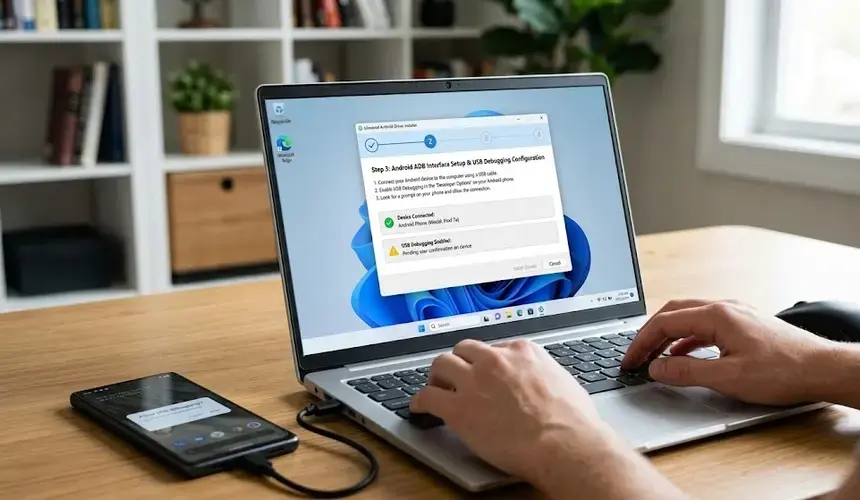
To enable USB debugging:
- Open Settings on the Android device
- Select About Phone
- Tap Build Number seven times
- Open Developer Options
- Enable USB Debugging
- Connect the device using a USB cable
- Authorize the computer connection prompt
Some PC utilities also automate driver installation for Samsung, Xiaomi, OnePlus, and Motorola devices.
Software Testing vs Debugging: Key Differences Explained
Software testing identifies defects, while debugging isolates and fixes the root cause of those defects. USB debugging tools mainly support debugging operations such as:
- Log monitoring
- Application tracing
- ADB shell commands
- USB driver diagnostics
- APK deployment
Many users also compare Android usb debugging software download tools with ADB download packages, Android Debug Bridge utilities, and Samsung USB debugging applications.
How to Download and Install Android USB Debugging Software Safely
Android usb debugging software download packages should always be obtained from verified developer platforms or trusted repositories.
Safe installation practices include:
- Downloading official Android SDK tools from Google
- Verifying software version compatibility
- Installing updated OEM USB drivers
- Avoiding modified APK files from untrusted sources
- Using digitally signed installers when available
Recommended Installation Workflow
| Step | Purpose |
| Download Platform Tools | Obtain official ADB binaries |
| Install USB Drivers | Ensure device recognition |
| Enable Developer Options | Allow debugging access |
| Connect Device | Start USB communication |
| Test ADB Connection | Verify successful pairing |
For Windows 10 systems, updated USB drivers are important because outdated drivers may block device authorization or ADB detection.
Common Android USB Debugging Software Problems and Fixes
Android usb debugging software download tools may encounter connection, authorization, or driver-related issues during operation.
Common Problems
- Device not detected by PC
- Unauthorized ADB connection
- Missing USB drivers
- Faulty USB cable
- Disabled Developer Options
Common Fixes
| Issue | Solution |
| Device not visible | Reinstall OEM USB drivers |
| ADB unauthorized | Revoke USB debugging authorizations |
| No ADB connection | Restart ADB server |
| USB debugging disabled | Re-enable Developer Options |
| Driver conflict | Remove old driver packages |
ADB troubleshooting often includes commands such as:
adb devices
adb kill-server
adb start-server
These commands help refresh Android Debug Bridge communication and restore USB connectivity.
Conclusion
Android USB debugging software download tools remain essential for Android diagnostics, application testing, and secure device communication across Windows and macOS systems. As Android development standards continue evolving, maintaining updated ADB utilities, USB drivers, and debugging permissions improves compatibility and operational reliability. For broader Android device management and troubleshooting workflows, users often also explore android usb debugging software solutions for advanced recovery and testing environments.
FAQ
What is Android USB debugging software used for?
Android USB debugging software allows computers to communicate with Android devices for testing, file transfer, diagnostics, and app deployment.
Is Android USB debugging software free to download?
Many Android debugging tools, including Android SDK Platform Tools and ADB utilities, are available free of charge.
Can USB debugging work without Developer Options?
No. USB debugging must be enabled inside Developer Options before ADB communication can begin.
Can USB debugging work without Developer Options?
ADB is generally safe when downloaded from official Android developer sources and used with authorized devices.
Why is my Android phone not detected during USB debugging?
The issue is commonly caused by outdated USB drivers, disabled debugging permissions, faulty cables, or incorrect ADB configuration.
Sources
- https://play.google.com/store/apps/details?id=com.bluedragonfly.developeroptions&hl=en_IN
- https://developer.android.com/tools/adb
- https://www.microsoft.com/en-in/p/android-usb-control-adb/9nfql7xzfcgz
- https://usb-debugging.en.softonic.com/android
- https://developer.android.com/studio/run/win-usb
- https://help.hcl-software.com/voltmx/v9.2/Iris/iris_user_guide/Content/AndroidUSBDebugging_Windows10.html
- https://play.google.com/store/apps/details?id=com.ds.usbdebug&hl=en_IN
- https://usb-debug-app.soft112.com/
- https://adb.clockworkmod.com/
- https://android-sdk-platform-tools.en.uptodown.com/windows