RCEE+Networks LLC
  • Home
  • About
  • Services
    • IMACAM™ Tech Support
  • Products
    • RetinaWiseAI™
  • Contact
1-844-2-THEOWL
info@rceenetworks.com
logotype
  • Home
  • About
  • Services
    • IMACAM™ Tech Support
  • Products
    • RetinaWiseAI™
  • Contact
logotype
  • Home
  • About
  • Services
    • IMACAM™ Tech Support
  • Products
    • RetinaWiseAI™
  • Contact
Author: Umesh Kumar Khiri
Home Umesh Kumar Khiri Page 14
Uncategorized
Umesh Kumar KhiriMarch 3, 2026 0 Comments
Share article:TwitterFacebookLinkedin
51 Views
6 Likes

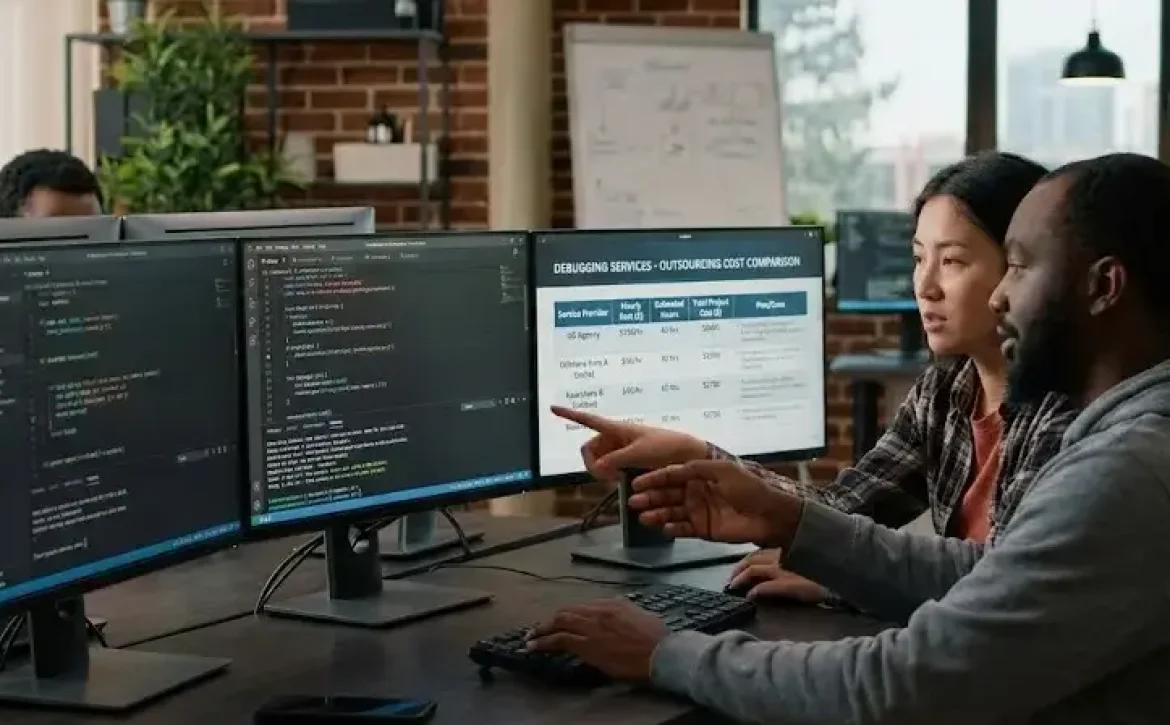
How Much Do Outsourced Debugging Services Cost: Comprehensive 2026 Pricing Overview

How much do outsourced debugging services cost refers to the average expenditure incurred when a business contracts external professionals or agencies to resolve software errors. Costs typically depend on project scale, technology stack, service duration, and vendor region. But what defines a fair market price for debugging support today?

Key Takeaways

  • Average global rate: $20–$150/hour
  • India offers the most competitive pricing
  • Monthly retainers range $800–$10,000+
  • Cost depends on code complexity and project scale
  • Outsourcing reduces downtime and resource strain

What Determines the Cost of Outsourced Debugging Services?

Several variables influence the total cost of outsourcing debugging:

  • Service scope: Minor bug fixes vs. full system audits.
  • Complexity level: Multi-language codebases and legacy integrations require higher expertise.
  • Engagement model: Hourly, monthly, or per-project billing.
  • Technology stack: Costs rise for specialized frameworks (e.g., embedded systems or cloud-native apps).
  • Geographic location: Rates differ significantly between the U.S., Europe, and Asia.

For context, people also search for related terms such as “software testing outsourcing rates,” “remote code debugging,” and “software maintenance costs.”

How Much Do Outsourced Debugging Services Cost Per Hour?

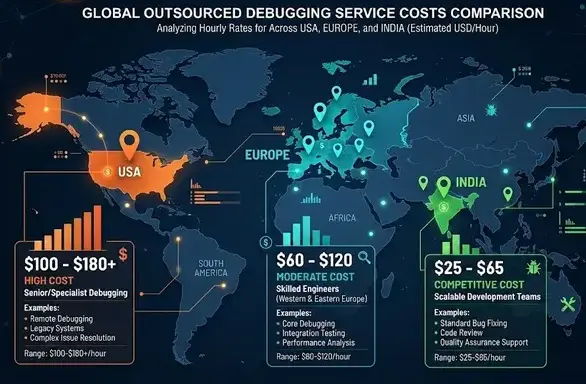
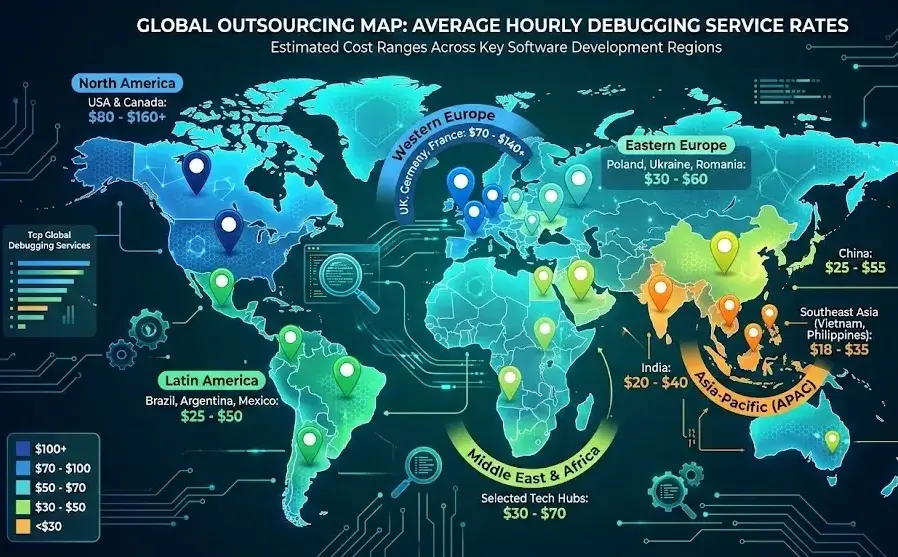
Average hourly rates in 2026 vary by provider location:

RegionAverage Hourly Rate (USD)Example Scope
North America$75–$150On-demand debugging, security fixes
Western Europe$60–$120System audits, code optimization
Eastern Europe$30–$60Ongoing code maintenance
India / Southeast Asia$20–$40Continuous bug fixing and QA
Latin America$25–$55Remote debugging support

Specialized debugging for enterprise or embedded systems can exceed $200/hour depending on urgency and tool requirements.

How Much Do Outsourced Debugging Services Cost Per Month?

Monthly retainers offer predictable pricing for continuous support.
Typical monthly costs include:

  • Small applications: $800–$1,500/month
  • Mid-size systems: $2,000–$4,500/month
  • Enterprise-grade infrastructure: $5,000–$10,000+/month

Retainers often cover proactive error monitoring, version tracking, and post-deployment debugging.
How Much Do Outsourced Debugging Services Cost in India?

India remains a global leader for cost-effective outsourced debugging services. Average rates in 2026 are:

  • Hourly: $20–$40
  • Monthly (dedicated resource): $1,000–$2,500
  • Per-project: $1,500–$5,000 depending on code volume

Indian agencies often bundle debugging with QA automation, code audits, and software optimization, delivering strong value for cost-conscious clients.

How Do Project-Based and Dedicated Models Compare?

Model TypeTypical UseCost RangeKey Benefit
Project-basedOne-time fixes or audits$500–$10,000+Defined scope and duration
Dedicated developer/teamLong-term debugging and maintenance$2,000–$8,000/monthOngoing reliability and code continuity
Hybrid modelFlexible on-demand debuggingVariableCombines scalability with budget control

The dedicated model suits organizations with frequent releases, while project-based contracts fit short-term or urgent fixes.
Are Outsourced Debugging Services Worth the Cost?

Yes—outsourcing saves recruitment time, grants access to skilled specialists, and ensures faster turnaround. Companies with distributed systems or multilingual codebases gain particular value from 24/7 remote debugging coverage.
Conclusion

Outsourced debugging services cost anywhere from $20/hour in India to $150/hour in the U.S., depending on expertise and project demands. Selecting the right pricing model ensures both quality and cost control.
For related insight into vendor selection and connectivity setup, explore [Where can I find remote code debugging] for practical guidance.

FAQ

How much does outsourcing cost?

Average outsourced debugging costs range from $20 to $150 per hour depending on location and skill level.

How much does it cost to outsource to India?

India-based debugging services typically cost $20–$40/hour or $1,000–$2,500/month.

What affects outsourced debugging prices?

Code complexity, technology stack, project urgency, and vendor region are key determinants.

Are there hidden costs in outsourced debugging?

Potential extras include emergency support, tool licenses, and after-hours maintenance.

Do companies offer debugging bundles with QA or DevOps?

Yes, many vendors integrate debugging with testing, automation, and CI/CD pipelines for efficiency.

Sources

http://advancedetectiveagency.com/business-bug-sweep-services-cost-in-india
https://www.indiamart.com/proddetail/debugging-investigation-services-21101580562.html?srsltid=AfmBOopJwNunjikQB-UapO7JriN_aAeyoXSUF1TtQabPIu0jh2exvxgK
https://www.encomputers.com/2024/01/how-much-do-outsourced-it-services-cost/
https://www.rekalltech.com/how-much-do-outsourced-it-services-cost/
https://www.wisemonk.io/blogs/software-development-outsourcing-costs-in-india
https://atidiv.com/cost-of-outsourced-it-support/
https://www.vrinsofts.com/outsourcing-software-development-cost-guide/
https://www.tradeindia.com/products/due-diligence-and-debugging-services-2906704.html
https://supportyourapp.com/blog/cost-of-outsourced-it-support/
https://dac.digital/it-outsourcing-costs-how-much-does-it-cost-to-outsource-software-development/
READ MORE
Uncategorized
Umesh Kumar KhiriMarch 2, 2026 0 Comments
Share article:TwitterFacebookLinkedin
46 Views
6 Likes

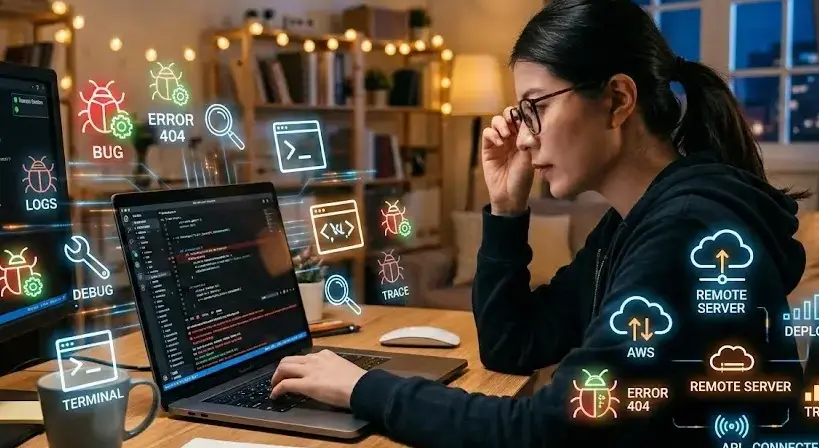
Where Can I Find Remote Code Debugging: 7 Proven Tools and Secure Setup Practices

Where can I find remote code debugging refers to identifying tools and environments that let developers inspect, test, and troubleshoot code on remote servers or client machines. This method enables seamless collaboration across global teams and supports applications that cannot be debugged locally. Remote debugging is essential in scenarios like mobile app development, embedded systems, or server-side testing.

KEY TAKEAWAYS

  • Remote code debugging allows inspection of remote systems from local environments.
  • Visual Studio, VS Code, and Chrome DevTools offer robust support.
  • Secure connections and version matching are critical for stability.
  • Ideal for cross-platform, server-side, and Android development.
  • Encrypted network protocols ensure enterprise-level data safety.

What Is Remote Code Debugging and Why Is It Important?

Remote code debugging enables developers to execute and monitor applications running on remote machines from their local IDE.
Key benefits include:

  • Detecting production-level issues without disrupting live systems
  • Cross-platform compatibility testing
  • Improved workflow for distributed development teams
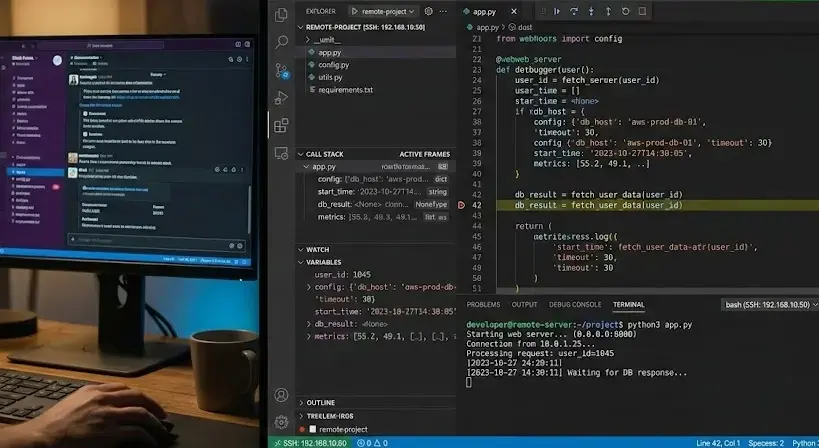
    Example: Debugging a Node.js application running on a remote Linux server via Visual Studio Code Remote Development tools.

Where Can I Find Remote Code Debugging Tools?

You can find remote code debugging tools in major integrated development environments (IDEs) and open-source platforms such as:

  • Visual Studio Remote Debugger (2022 & 2026 versions) – for .NET and C++ projects.
  • VS Code Remote Development Extension – supports SSH, WSL, and Containers.
  • JetBrains IntelliJ IDEA – for Java and Kotlin debugging using TCP/IP.
  • Chrome DevTools Remote Debugging – ideal for web and Android-based projects.
  • LLDB Remote Debugger – for C/C++ on Unix systems.

Developers often explore related concepts such as remote debugging Android, remote debugging Chrome, and remote tools for Visual Studio 2026 for specialized workflows.

How Does Remote Debugging Work in Visual Studio?

Remote debugging in Visual Studio requires a Remote Tools package installed on the target machine.
Steps:

  1. Install Remote Tools for Visual Studio (matching the IDE version).
  2. Launch the Remote Debugger and set the appropriate authentication mode.
  3. Access Debug → Attach to Process in Visual Studio, then input the remote machine’s IP for connection..
  4. Begin debugging session securely via network connection.
    This configuration allows breakpoint monitoring and variable inspection across devices.

Can I Use Remote Code Debugging for Web and Chrome Applications?

Yes. Chrome DevTools supports remote debugging over USB or network connections.
Example Workflow:

  • Enable “Remote Debugging” by launching Chrome with the flag:

chrome.exe –remote-debugging-port=9222

  • Connect via Chrome DevTools → Devices → Inspect.
    This method is widely used for debugging web apps, progressive web applications (PWAs), and hybrid Android projects.

How Is Remote Debugging Used in Android Development?

Android Studio and Chrome DevTools provide built-in remote debugging options.
Common setup:

  • Connect Android device via USB or ADB.
  • Enable “Developer Options” → “USB Debugging.”
  • Use adb connect <IP> for wireless debugging.
    Remote code debugging helps test live mobile app performance on real devices, ensuring platform consistency.

What Are the Best Practices for Secure Remote Debugging?

To protect data and maintain compliance with enterprise policies:

  • Use encrypted connections (SSH or TLS)
  • Configure firewall and access control lists (ACLs)
  • Do not perform debugging operations in operational production environments.
  •  Implement multi-factor authentication to safeguard sensitive debugging environments.

What Are Common Issues and How to Troubleshoot Them?

Frequent issues include:

ProblemLikely CauseRecommended Fix
Connection timeoutFirewall blocking portOpen the required port (e.g., 4020–4030 for Visual Studio)
Mismatched debugger versionsIDE and remote tool mismatchInstall the same Visual Studio version remotely
Access deniedIncorrect permissionsRun as Administrator or update credentials
Session dropNetwork instabilityUse persistent SSH or VPN connection

Conclusion

Where Can I Find Remote Code Debugging- Remote code debugging bridges the gap between local development and distributed environments by offering precise control and visibility across systems. Whether using Visual Studio, Chrome DevTools, or Android Studio, implementing structured debugging ensures efficient and secure code optimization.
For developers seeking advanced enterprise-ready tools, explore Top rated remote debugging services to streamline workflow efficiency.

FAQ

Where can I debug my code?

You can debug your code in IDEs like Visual Studio, VS Code, or IntelliJ IDEA using built-in or remote debugging features.

What is remote debugging?

Remote debugging lets you inspect and control an application running on another device or server through your local IDE.

Where can I see debugging?

Debugging sessions appear in the IDE’s debug console or terminal, displaying breakpoints, variable states, and stack traces.

How do I open remote debugging in Chrome?

Launch Chrome using –remote-debugging-port=9222, then open Chrome DevTools → Devices → Inspect to start the session.

Sources

https://learn.microsoft.com/en-us/visualstudio/debugger/remote-debugging?view=visualstudio
https://code.visualstudio.com/docs/remote/remote-overview
https://developer.chrome.com/docs/devtools/remote-debugging
https://stackoverflow.com/questions/73378057/how-to-debug-remote-python-script-in-vs-code
https://www.jetbrains.com/help/idea/tutorial-remote-debug.html
https://lldb.llvm.org/use/remote.html
https://www.freecodecamp.org/news/remote-debugging-tools/
https://medium.com/@spe_/debugging-c-c-programs-remotely-using-visual-studio-code-and-gdbserver-559d3434fb78

READ MORE
Uncategorized
Umesh Kumar KhiriMarch 2, 2026 0 Comments
Share article:TwitterFacebookLinkedin
51 Views
9 Likes

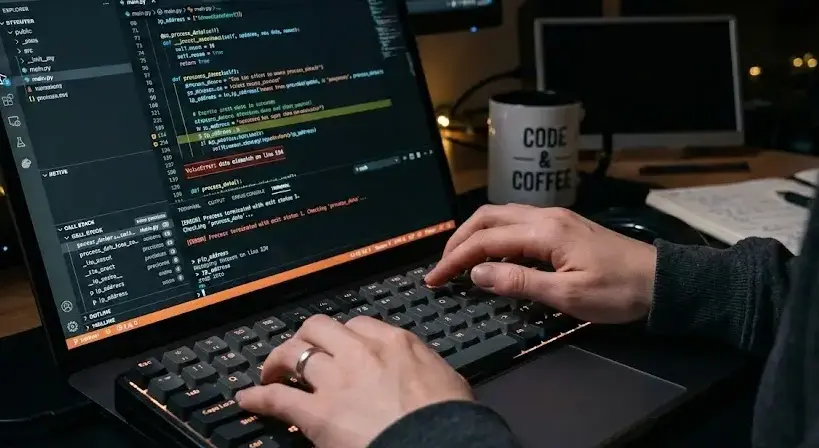
Top Rated Remote Debugging Services: 7 Proven Tools for Developers

Top rated remote debugging services refer to cloud-based or network-enabled tools that allow developers to inspect, trace, and resolve code issues running on remote machines. These services are critical in modern DevOps, supporting multi-environment development, mobile testing, and production troubleshooting.

Key Takeaways

  • Remote debugging enables live inspection of code on distant systems.
  • Visual Studio and Chrome DevTools dominate modern debugging ecosystems.
  • Security and compliance are critical for enterprise adoption.
  • Remote debugging improves efficiency in cloud, IoT, and hybrid workflows.
  • Future trends include AI-driven diagnostics and unified observability.

What are the top rated remote debugging services used in modern development?

Leading remote debugging services combine real-time code inspection, session recording, and collaboration tools.
Commonly used platforms include:

  • Visual Studio Remote Debugger – Ideal for .NET and C# environments.
  • Chrome DevTools – Provides JavaScript and web debugging directly in the browser.
  • Bytebeam Remote Debugging – Designed for IoT and embedded device monitoring.
  • Remote.it – Enables secure, encrypted access to remote devices without VPNs.
  • Testmu AI Debugging Suite – Integrates with automation testing for cross-browser validation.
    These services streamline debugging by removing location constraints and enabling real-time analysis across global teams.

How do remote debugging services work in distributed development?

Remote debugging connects a local IDE to a remote process through a secure protocol such as SSH, WebSocket, or HTTPS. The workflow typically involves:

  1. Attaching a debugger to the target application.
  2. Establishing a secure session between local and remote environments.
  3. Analyzing variables, logs, and call stacks live during execution.
  4. Applying patches or breakpoints without halting entire systems.
    This process reduces turnaround time in agile, containerized, and CI/CD-based projects.

Why are top rated remote debugging services important for cloud and IoT applications?

Remote debugging is essential in cloud-native and IoT ecosystems because it provides:

  • Real-time visibility into distributed code execution.
  • Minimal downtime with live patch deployment.
  • Scalability across multiple devices or containers.
    For example, Bytebeam’s IoT debugging enables remote firmware updates and data visualization for connected devices. Similarly, Microsoft Azure supports remote debugging directly through Visual Studio for seamless integration.

What are key features to evaluate in top rated remote debugging services?

When selecting a debugging solution, focus on:

FeatureDescription
Cross-Platform SupportCompatibility with Windows, Linux, macOS, Android, iOS
Secure ConnectivityEncrypted channels (SSL, SSH, or token-based authentication)
Collaboration ToolsShared sessions and annotations
Session RecordingReplayable debugging for post-mortem analysis
IDE IntegrationWorks with VS Code, JetBrains, Eclipse
Developers also explore related solutions like remote debugging C# Visual Studio 2026, Android debugging apps, and remote tools for Visual Studio 2022.

How does remote debugging enhance testing and production reliability?

Remote debugging enables developers to detect runtime issues that local testing cannot reproduce. Benefits include:

  • Early identification of environment-specific bugs.
  • Reduced manual configuration in distributed builds.
  • Faster resolution in cloud-hosted CI pipelines.
    A similar workflow is often discussed alongside observability tools, application performance monitors, and automated error reporting services used in continuous deployment.

What security standards apply to remote debugging environments?

Security compliance is a key factor. Reputable services follow:

  • TLS 1.3 encryption for data-in-transit protection.
  • Role-based access control (RBAC) for developer permissions.
  • Compliance frameworks such as ISO 27001, SOC 2, and GDPR.
    These standards ensure that remote sessions remain tamper-proof and auditable across enterprise systems.

What are future trends shaping top rated remote debugging services?

Emerging trends include:

  • AI-assisted debugging for anomaly prediction.
  • Edge debugging for real-time IoT nodes.
  • Unified cloud observability integrating debugging, tracing, and logging in one dashboard.
    As multi-cloud adoption grows, developers are increasingly investing in secure, high-performance debugging ecosystems to support global operations.

Conclusion

Top rated remote debugging services are transforming modern development through secure, intelligent, and distributed troubleshooting. Future innovations will continue integrating these tools into automated build pipelines and hybrid cloud platforms. For region-specific insights, see related coverage on debugging services in Massachusetts.

FAQ

What is F5 F6 F7 F8 in debugging?

F5 runs the program, F6 steps over functions, F7 steps into functions, and F8 continues to the next breakpoint.

Which IDE is best for debugging?

Visual Studio, JetBrains Rider, and Eclipse are top-rated IDEs for integrated debugging and remote development.

How to do remote debug?

Configure the remote host, enable port forwarding, attach the debugger, and authenticate using SSH or secure tokens.

How to enable remote debug?

Enable the remote debugger in your IDE settings, specify the target IP and port, and ensure both systems share compatible runtime environments.

Sources

https://www.bytebeam.io/remote-debugging
https://www.freecodecamp.org/news/remote-debugging-tools/
https://www.browserstack.com/guide/debugging-tools
https://www.testmuai.com/blog/best-debugging-tools/
https://learn.microsoft.com/en-us/visualstudio/debugger/remote-debugging?view=visualstudio
https://conclusive.tech/glossary/debugging-tools-the-best/
https://arc.dev/hire-developers/remote-debugging
https://community.shotgridsoftware.com/t/remote-debugging/3869
https://www.remote.it/resources/debug-production-with-remote-it
https://www.meegle.com/en_us/topics/debugging/debugging-with-remote-debugging

READ MORE
Uncategorized
Umesh Kumar KhiriMarch 2, 2026 0 Comments
Share article:TwitterFacebookLinkedin
45 Views
7 Likes

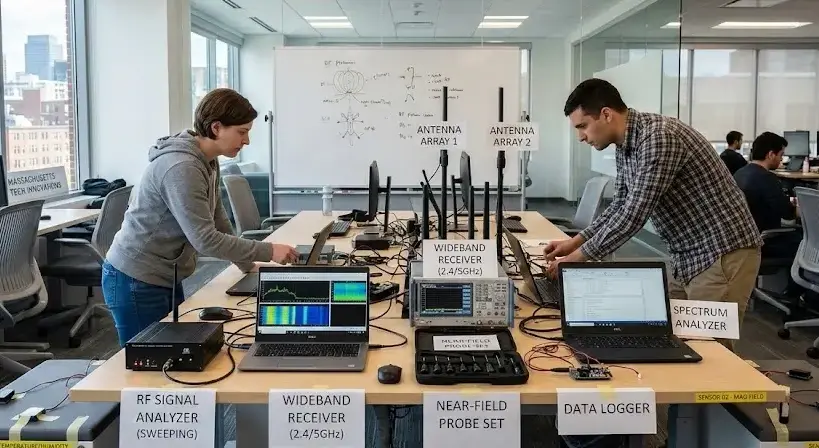
Debugging Services in Massachusetts: 7 Expert Insights to Secure Your Space and Data

Debugging services in Massachusetts refer to professional inspections that detect, analyze, and remove hidden surveillance devices or software-based vulnerabilities in communication and data systems. They are used to ensure privacy, protect intellectual property, and maintain operational integrity. What types of debugging are typically performed, and how do professionals ensure reliable results?

Key Takeaways

  • Debugging services in Massachusetts secure spaces from surveillance threats.
  • Professional sweeps employ RF, infrared, and digital analysis tools.
  • Services comply with FCC and Massachusetts state investigation regulations.
  • Costs vary by complexity and location type.
  • Reliable providers offer confidentiality and detailed reporting.

What Are Debugging Services in Massachusetts?

Debugging services in Massachusetts include systematic electronic and physical sweeps to locate hidden transmitters, spyware, or compromised hardware. These services are performed by certified investigators using specialized instruments.
Core processes include:

  • RF spectrum analysis to detect active signals
  • Infrared and thermal imaging to locate hidden devices
  • Non-linear junction detection for passive circuits
  • Data and network traffic monitoring for digital breaches

Who Needs Debugging Services in Massachusetts?

Organizations and individuals seeking protection against eavesdropping, information leaks, or digital espionage commonly request these services.
Examples include:

  • Corporate offices handling sensitive trade data
  • Law firms managing confidential case files
  • Political campaigns ensuring secure communication
  • High-net-worth individuals requiring private space audits

A related concept often discussed alongside these services includes lie detector test Rhode Island and private investigation services, as both focus on truth verification and risk mitigation.

How Do Professionals Conduct Debugging Sweeps?

Debugging professionals use a multi-phase process to ensure no surveillance or interference remains undetected:

  1. Assessment: Review of site layout and communication systems
  2. Signal Sweep: Use of spectrum analyzers and detection probes
  3. Device Inspection: Checking walls, electronics, and cabling for concealed transmitters
  4. Digital Forensics: Analysis of network logs and connected systems
  5. Final Verification: Generating a report with identified threats and corrective actions

What Equipment Is Used in Debugging Services in Massachusetts?

Industry professionals employ advanced and compliant-grade tools such as:

  • Broadband RF detectors (for wide frequency range scans)
  • Spectrum analyzers and time-domain reflectometers
  • Non-linear junction detectors (NLJD) for microchip discovery
  • Portable analyzers for vehicle and mobile device checks

These tools align with Federal Communications Commission (FCC) standards and are calibrated for precision.

Are Debugging Services in Massachusetts Regulated?

Yes. Reputable providers comply with state and federal privacy, communication, and investigation laws.
Key compliance elements:

  • Licensing under Massachusetts investigative service regulations
  • Adherence to Federal Communications Commission frequency monitoring limits
  • Data handling consistent with privacy laws such as Federal Trade Commission consumer protection guidelines

How Much Do Debugging Services Cost in Massachusetts?

Pricing depends on area size, complexity, and equipment used.
Typical range:

Service TypeAverage Cost (USD)
Residential Sweep$500–$1,500
Corporate Office Sweep$2,000–$7,000
Vehicle/Device Debugging$300–$800
Digital Forensics$1,000–$5,000

Costs may increase if multiple signal types or complex systems are involved.

How to Choose a Reliable Debugging Company in Massachusetts?

Select a provider that demonstrates:

  • State licensing and verified experience
  • Use of advanced, calibrated debugging tools
  • Clear post-service reporting and confidentiality agreements
  • Positive local reputation (examples include ATech Investigation Services and Eagle Investigations)

Conclusion

Debugging services in Massachusetts are essential for ensuring secure, interference-free communication and data integrity. They integrate advanced electronic detection, compliance frameworks, and professional discretion. For ongoing protection, individuals can explore debugging services near me to locate certified professionals offering local assistance.

FAQ

What does a debugging sweep include?

It includes detecting, analyzing, and removing hidden devices or electronic interference sources.

How long does a debugging inspection take?

Typical residential or office sweeps take 2–6 hours, depending on the environment size.

Are debugging services legal in Massachusetts?

Yes, when performed by licensed investigative or security professionals.

Can debugging detect wireless cameras?

Yes. RF and infrared scanners identify both active and passive wireless surveillance devices.

Do companies offer periodic debugging maintenance?

Many professionals provide scheduled quarterly or annual sweeps for high-risk environments.

Sources

https://www.spycatchersllc.com/massachusetts-bug-sweep-company/
https://atechpi.com/services/debugging-bug-sweep-services/
https://dlginvestigators.com/investigation-services/debugging-sweeps/
https://keatechinc.com/engineering-services/embedded-system-debugging-reverse-engineering-and-repairs/
https://www.haminvestigations.com/norton-ma-bug-sweeps
https://eagleinvestigations.com/
https://www.debugpestcontrol.com/southeastern-massachusetts/
https://bostonbugsweep.com/
https://www.cics.umass.edu/news/2025-distinguished-artifact-award
https://atechpi.com/

READ MORE
  • 1
  • …
  • 12
  • 13
  • 14

Recent Posts

  • Debugging Goals in Software Testing: 7 Powerful Benefits for Reliable Applications
  • Importance of Debugging in Software Development: 7 Powerful Benefits for Software Quality
  • What Is the Purpose of Debugging in Software Testing? 7 Powerful Benefits You Must Know
  • How to Debug Software: 7 Essential Methods for Finding and Fixing Errors
  • Debugging in Software Development Cycle: 7 Powerful Techniques for Error-Free Applications

Recent Comments

  1. Fred Hyman on Yellow Cap
  2. Fred Hyman on T-Shirt Full Hand
  3. Fred Hyman on Yellow Cap
  4. Randal Gray on Black T-Shirt
  5. John Harris on Black T-Shirt

Archives

  • June 2026
  • May 2026
  • April 2026
  • March 2026

Categories

  • AI in App Development
  • Uncategorized
Recent Posts
  • Debugging Goals in Software Testing: 7 Powerful Benefits for Reliable Applications
    Debugging Goals in Software Testing: 7 Powerful Benefits for Reliable Applications
    June 9, 2026
  • Importance of Debugging in Software Development: 7 Powerful Benefits for Software Quality
    Importance of Debugging in Software Development: 7 Powerful Benefits for Software Quality
    June 9, 2026
  • What Is the Purpose of Debugging in Software Testing? 7 Powerful Benefits You Must Know
    What Is the Purpose of Debugging in Software Testing? 7 Powerful Benefits You Must Know
    June 8, 2026
Categories
  • AI in App Development5
  • Uncategorized129
logotype

RCEENetworks LLC

1-844-284-3695

info@rceenetworks.com

3010 Lyndon B Johnson Fwy #1200, Dallas, TX 75234, United States

Menu

HomeServices

ProductsBlog

Contact

Other Links

RetinaWiseAI™Privacy PolicyContent PolicyTerms & Conditions

Social Links

TwitterFacebookInstagramLinkedin

Copyright © 2026 RCEENetworks LLC. All Rights Reserved