Arduino software serial debug is the process of testing, monitoring, and troubleshooting serial communication implemented through the Arduino SoftwareSerial library. The method allows developers to create additional serial ports using digital pins instead of dedicated hardware UART pins. It is commonly used in embedded systems that require communication with GPS modules, Bluetooth devices, GSM modules, and serial sensors while maintaining stable debugging output.
Key Takeaways
- Arduino software serial debug enables extra UART communication using digital pins
- SoftwareSerial is useful for GSM, GPS, Bluetooth, and sensor modules
- Lower baud rates improve debugging reliability
- Logic analyzers and serial monitors help diagnose communication issues
- Hardware UART remains more stable than software-emulated serial communication
- Proper interrupt management reduces data corruption risks
Programming Debug Software
What Is Arduino Software Serial Debug in Programming Applications?
Arduino software serial debug is commonly used in programming debug software to inspect transmitted and received UART data during embedded application development. The SoftwareSerial library emulates serial communication through configurable digital pins.
Common applications include:
- GPS communication debugging
- GSM module troubleshooting
- Bluetooth HC-05 monitoring
- Sensor data verification
- IoT device diagnostics
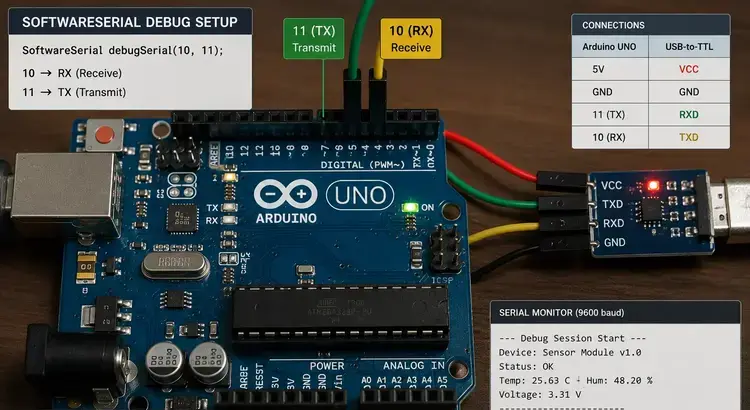
Example configuration:
#include <SoftwareSerial.h>
SoftwareSerial mySerial(10, 11);
void setup() {
Serial.begin(9600);
mySerial.begin(9600);
}
This setup creates a secondary serial channel using pins 10 and 11.
USB Debugging Software for Windows
Windows-based Arduino IDE tools allow developers to monitor software serial communication through USB-connected Serial Monitor interfaces.
Typical tools include:
| Tool | Function |
| Arduino IDE Serial Monitor | Real-time serial output |
| PuTTY | External serial terminal |
| Tera Term | UART debugging |
| Visual Micro | Advanced debugging integration |
Serial Debugging Software
How Does Arduino Software Serial Debug Work?
Arduino software serial debug works by emulating UART communication in software rather than using dedicated hardware serial peripherals. The library manages timing-sensitive RX and TX operations through interrupt-driven communication.
Important characteristics include:
- Only one software serial port can listen at a time
- High baud rates may reduce reliability
- Timing conflicts can occur with interrupts
- Boards with multiple hardware UARTs often perform better
Supported baud rates generally include:
- 9600
- 19200
- 38400
- 57600
Lower baud rates are usually more stable for debugging.
Software Tools Debug Monitor
A debug monitor helps visualize transmitted data and detect communication failures.
Useful debugging indicators include:
- Garbled characters
- Missing packets
- Baud mismatch errors
- Buffer overflow warnings
Example debug output:
mySerial.println(“Sensor Active”);
Developers often discuss Arduino software serial debug alongside Arduino code debugger online tools, SoftwareSerial examples, and serial monitor configuration methods for embedded troubleshooting.
Hardware and Software Debugging Tools
Which Hardware and Software Tools Improve Arduino Software Serial Debug?
Arduino software serial debug becomes more reliable when supported by dedicated hardware and software debugging tools.
Common hardware tools:
| Tool | Purpose |
| Logic Analyzer | Signal timing inspection |
| USB-to-TTL Adapter | External UART monitoring |
| Oscilloscope | Waveform analysis |
| FTDI Module | Serial communication testing |
Common software tools:
- Arduino IDE 2 Serial Monitor
- Serial Plotter
- Visual Micro Debugger
- SerialDebug GitHub library
Software Used to Debug C++ Code
Because Arduino sketches are primarily written in C++, debugging practices follow standard embedded C++ development principles.
Recommended methods include:
- Serial print debugging
- Conditional debug macros
- Non-blocking logging
- Watch variable inspection
- Incremental module testing
Example debug macro:
#define DEBUG 1
#if DEBUG
Serial.println(“Debug Enabled”);
#endif
What Are Common Arduino Software Serial Debug Problems?
Arduino software serial debug may experience communication instability due to timing limitations and CPU interrupt conflicts.
Frequent issues include:
| Problem | Cause |
| Missing data | Interrupt timing conflicts |
| Random characters | Incorrect baud rate |
| Serial freezing | Buffer overflow |
| Communication delay | CPU overload |
Best practices for stability:
- Use lower baud rates
- Avoid excessive Serial.print statements
- Limit simultaneous interrupts
- Prefer hardware UART when available
- Separate debug and communication channels
How Do You Install the SoftwareSerial Library in Arduino?
Most Arduino IDE versions already include the SoftwareSerial library by default.
Manual installation steps:
- Open Arduino IDE
- Select Sketch
- Choose Include Library
- Open Manage Libraries
- Search for “SoftwareSerial”
- Install or update the library
After installation, include:
#include <SoftwareSerial.h>
Conclusion
Arduino software serial debug provides a flexible method for monitoring UART communication when hardware serial ports are limited. Stable debugging depends on correct baud configuration, controlled interrupt usage, and proper diagnostic tools.
As embedded applications continue expanding across IoT and automation systems, combining SoftwareSerial techniques with structured diagnostic practices improves communication reliability and maintainability. Developers working with advanced embedded troubleshooting may also benefit from understanding related concepts in arduino debugging software for broader diagnostic workflows.
FAQ
What is Arduino software serial debug?
Arduino software serial debug is the process of troubleshooting serial communication created through the SoftwareSerial library using digital pins instead of hardware UART pins.
Is SoftwareSerial slower than hardware serial?
Yes. SoftwareSerial relies on CPU timing and interrupts, making it less efficient and less reliable at high baud rates compared to hardware UART.
Which baud rate is best for Arduino software serial debug?
9600 baud is commonly recommended because it provides stable communication in most embedded debugging scenarios.
Can SoftwareSerial work on all Arduino boards?
Most Arduino boards support SoftwareSerial, but boards with multiple hardware UARTs often provide better performance for debugging tasks.
Why does SoftwareSerial show garbled text?
Garbled text usually occurs because of mismatched baud rates, interrupt conflicts, or unstable signal timing.
Sources
- https://docs.arduino.cc/learn/microcontrollers/debugging/
- https://www.arduino.cc/en/Reference/softwareSerial
- https://docs.arduino.cc/software/ide-v2/tutorials/ide-v2-serial-monitor
- https://github.com/JoaoLopesF/SerialDebug
- https://forum.arduino.cc/t/serial-monitor-debug-software-serial-communication/971668
- https://www.visualmicro.com/post/2012/05/06/Configure-debug-for-other-types-of-serial-transport
- https://wiki.seeedstudio.com/Software-Serial/
- https://forum.arduino.cc/t/managing-serial-print-as-a-debug-tool/1024824