
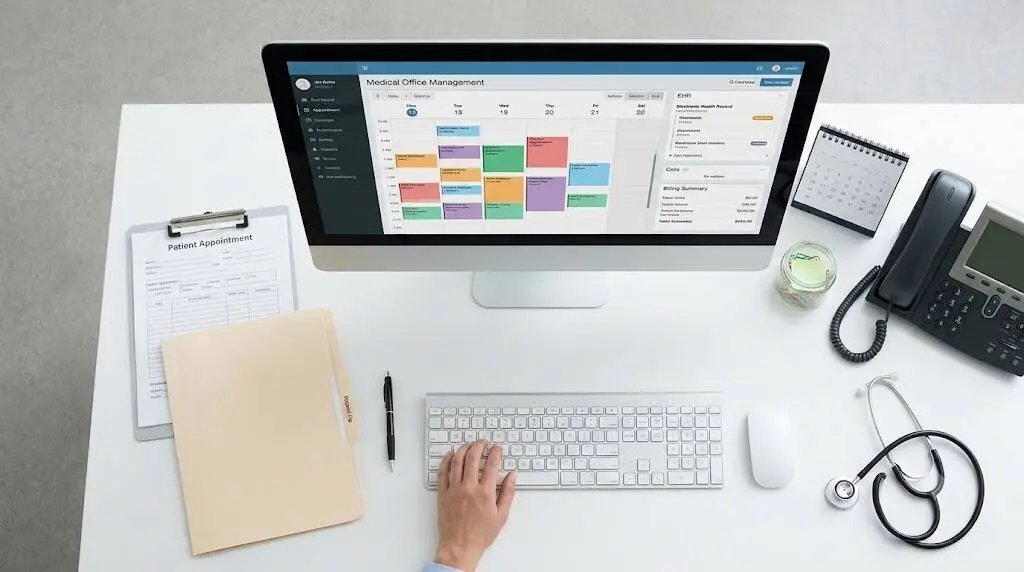
Every day, a medical clinic handles dozens of small but essential tasks, from booking appointments and checking insurance coverage to submitting claims and collecting what patients owe. The best medical office software ties these tasks together in one smooth, reliable process. Choose badly and the opposite happens: your staff spend their time on workarounds instead of the work itself.
Below, you will find an explanation of medical practice management software, the features worth prioritizing, the way security, pricing and implementation play out, and a method for comparing vendors that sees past polished sales demos.
Key Takeaways
- Scheduling, registration, billing and reporting all fall under medical office software, which runs the business side of patient care.
- EHR software is a separate category, even though a growing number of products offer both in one package.
- Your first checks should be HIPAA safeguards, audit logs and a signed Business Associate Agreement.
- Billing tools that verify eligibility and scrub claims help keep your revenue protected.
- Look at what the system costs over several years, since the monthly fee tells only part of the story.
- Put a few shortlisted vendors through your own workflows, then pilot your favorite before committing.
What Is Medical Office Software?
Medical office software covers the administrative work of a healthcare practice: registering patients, booking appointments, verifying insurance, billing, processing claims and reporting on finances. Vendors frequently use the name medical practice management software, which refers to exactly the same category.
Do not confuse it with the electronic health record. Clinical details such as diagnoses, visit notes, medications and lab results live in the EHR. Office software handles what surrounds each visit, meaning who is on the calendar, what the insurer owes and which payments have arrived.
Vendor websites often blur the distinction because many suites bundle both functions. Some products focus on only one and connect to the EHR software you already use through an integration.
Once you grasp this split, shopping for the best medical office software gets simpler, and you avoid paying for tools that would sit unused.
Must-Have Features to Look For
Feature lists tend to read alike across vendor websites. The following capabilities are the ones that influence daily work when you compare the best medical office software:
- Scheduling: patient scheduling software needs to support multiple providers and locations, online booking, waitlists and automated reminders that lower no-show rates.
- Registration and intake: digital forms, insurance card capture and eligibility verification finished before the patient walks through the door.
- Billing and claims: medical billing software ought to cover charge capture, claim scrubbing, electronic submission, denial tracking and payment posting.
- Patient communication: online payments, secure messaging, text reminders and a patient portal.
- Reporting: dashboards covering collections, denial rates, wait times and how productive each provider is.
- Telehealth and e-prescribing: included in the product or linked to it, with support for prescribing controlled substances where your specialty calls for that.
- Documents and inventory: a place to keep referrals and consent forms, plus tracking of vaccine and supply stock.
- Automation: templates, alerts and task routing that free the front desk from repetitive work.
- Quality reporting: help producing reports your programs require, MIPS among them, together with links to lab and imaging systems.
Features Patients Will Notice
How simple your practice is to deal with affects how patients see it, and your software largely determines that experience. Several features make a noticeable difference.
- Portal: patients can schedule visits, review results and send messages to the care team around the clock.
- Digital intake: patients complete forms before arriving, so check-in takes just a few minutes.
- Secure texting: reminders and brief questions go through a channel that protects health information.
- Online payments: patients pay balances by card or phone and receive clear statements.
Request a demo of these screens as a patient would see them, not just the staff dashboard. If patients find a tool awkward, more of their calls will land back on your front desk.
Why Security and HIPAA Compliance Matter Most
Any system that stores or processes patient data has to protect it, so the best medical office software makes security a starting requirement instead of an extra. The HIPAA Security Rule sets out administrative, physical and technical protections for electronic protected health information, and a vendor that processes your data takes on that duty as well. Since HHS has proposed stricter cybersecurity rules, ask each vendor how it keeps pace with regulatory changes.
Ask whether the product offers encryption both in transit and at rest, role-based access, multi-factor login, thorough audit logs and routine backups. Get a signed Business Associate Agreement before moving any patient data. An independent security report, for example SOC 2, is worth requesting, and so is an explanation of how the vendor deals with breach notification and disaster recovery.
Clinics that also run connected devices should put the same questions to the best medical IoT software they select for those devices.
Connecting With Your Other Systems
When software cannot connect with your other tools, staff end up entering data twice and making mistakes. Find out how it integrates with your EHR software, lab systems, clearinghouse, payment processor and accounting tools.
HL7 and FHIR are standards that smooth data exchange. Should the product include EHR functions, check for ONC certification. Separate the integrations that function today from those on a future roadmap, and ask whether any of them add a fee.
You should also be able to export your own data in a usable format. Because federal rules discourage information blocking, a vendor ought to be upfront about how exporting works.
Billing and Revenue Cycle Features
Weak software does its worst damage to revenue. Good medical billing software confirms eligibility before the appointment, flags coding and data errors before a claim is submitted and monitors each claim all the way to payment.
Features to seek include electronic remittance posting, denial management that explains reasons and supports appeals, patient statements with online payment, and aging reports that are easy to read. Certain vendors also provide outsourced billing. A small team may benefit, but make sure you know who owns the data and how reports will reach you.
Cloud-Based or On-Premises?
Staff can work from any location on a cloud system, which also updates itself and generally costs less to launch. An on-premises setup offers more control over hardware, but it demands servers, IT support and backups you manage yourself.
Cloud is the usual choice for new buyers. If that is your plan, find out about uptime guarantees, the location where your data is stored and what happens to your records should you leave.
Outages deserve a question too. A dependable vendor can lay out its backup schedule and recovery time, and explain how your team keeps working until service comes back, perhaps with read-only access to the day’s schedule.
Comparing the Main Software Types
Products group into several broad categories. The table below indicates where each category fits best. No vendors are named, so use it to trim your options before you ask for demos.
| Type | Best for | Watch out for |
| All-in-one suite (scheduling, billing and records in one) | Practices preferring one login and one vendor | More setup time and a steeper learning curve |
| Platform led by the EHR, with an office module | Practices that put clinical care first | Billing tools may seem basic |
| System focused on billing and revenue | Large claim volumes or frequent denials | Thinner clinical functionality |
| Patient engagement and scheduling tools | Practices battling no-shows and busy phone lines | Requires a connection to a separate billing system |
| Specialty-focused software | Behavioral health, eye care, orthopedics, dermatology | Harder to adapt when new services are added |
| Enterprise-grade platform for multiple locations | Large groups operating many sites | Pricier, with a lengthier implementation |
Best Medical Office Software by Practice Type
Requirements differ depending on a practice’s size and specialty. This rough guide may help:
- Solo and small practices: a simple setup, billing included, little training and pricing that is easy to predict. A few start with medical billing software alone and add scheduling at a later point.
- Mid-size groups: better reporting, role permissions, patient scheduling software able to manage many providers, and a built-in clearinghouse.
- Multi-location and multi-specialty groups: centralized settings, workflows tailored to each site, deeper analytics and support they can count on.
- Behavioral health: standing appointments, intake forms, telehealth capability and superbills.
- Specialty clinics, for example eye care or orthopedics: templates for the specialty, accurate coding and connections to imaging or lab tools.
How Much Does It Cost?
No standard price exists for the best medical office software. What you pay hinges on the number of providers or users, the modules you pick, and whether the model is a monthly subscription, a license fee or a share of collections.
Prices that vendors list publicly start below $100 per month for light tools designed for small practices and climb to several hundred dollars per provider monthly for more complete clinical platforms. Because many vendors keep their prices private, view these numbers only as a rough guide.
Be alert to extras including implementation, data migration, training, clearinghouse fees, payment processing, added storage and customization. Standalone medical billing software is frequently priced differently from a full suite, so make sure you are comparing equivalent offerings. A written quote covering year one and year three costs is worth requesting.
Tracking Your Return on Investment
What matters is the change you see after go-live, not the sticker price. Capture a few figures before switching and again at three to six months:
- Clean-claim rate: claims accepted on first submission, as a share of all claims.
- Denial rate: how many claims get rejected, along with the reasons.
- Days in accounts receivable: how long payment takes to arrive.
- No-show rate: a drop in missed visits, especially when reminders are automated.
- Check-in time: minutes the front desk saves per patient.
Small gains in these areas can still be worth more than the monthly fee.
Rollout, Data Migration and Staff Training
A careful rollout is needed even with the best medical office software. How long it takes depends on practice size and complexity. Commonly cited estimates span a few weeks for a solo practice to several months for a large group, and data cleanup or training may add time.
Before moving records, clean them up and decide how much history to bring along. Pilot with a small group, schedule training for off-peak hours and avoid your busiest season for go-live. It also helps to keep the old system available in read-only mode for some time.
How to Choose the Best Medical Office Software
- List the pain points you want to solve, for instance denials, no-shows or slow check-in.
- Decide on a budget and a go-live window that is realistic.
- Write out the features, security requirements and integrations you must have.
- Pick three or four vendors that serve your specialty and ask them for demos based on your own scenarios.
- Contact references from similar practices and ask how quickly support responds.
- Examine the contract for term length, renewal terms, price increases and data export rights.
- Test with a small team first, then expand to everybody.
Score each vendor on identical criteria, so the choice does not hinge on who gave the slickest demo.
What to Ask During Every Demo
Carry this list to each demo and put the answers next to each other:
- Can you demonstrate my busiest workflow, starting with a new-patient visit and ending with a paid claim?
- How is first-pass claim acceptance measured and reported?
- Which integrations work today, and which carry an additional charge?
- How are security incidents and breach notification handled?
- What is involved in onboarding, and who would be my primary contact?
- What hours does support run, and what are the response times?
- If I leave, how do I get all of my data out?
- What would my total cost be in the first year and the third year?

Reading Reviews and Spotting Biased Rankings
Ranking articles and review sites help, though they call for caution. Vendors write many of these lists, or the sites earn affiliate fees, so rankings can reflect marketing instead of real fit.
- Lean on verified user reviews, and read three-star ones, which tend to be the most realistic.
- Look for recurring themes on support, billing accuracy and updates, not one-off complaints.
- Find out if the reviewer runs a practice with your size and specialty.
- Be careful when a publisher puts its own product on top of a list.
A list is only a starting point; confirm its claims in a demo and by talking to references.
Mistakes Buyers Often Make
- Selecting on features alone, without thinking about how the system feels in daily use.
- Not involving front desk and billing staff in the evaluation.
- Ignoring contract details about renewals, price increases and data export.
- Assuming data migration and training will take less time than they do.
- Purchasing more modules than the practice is likely to use.
Warning Signs to Watch For
If a vendor on your shortlist for the best medical office software shows any of these warning signs, think twice:
- Resistance to signing a Business Associate Agreement.
- Fuzzy answers about encryption, access control or backups.
- Prices that remain hidden until the sales process is well along.
- No references from practices comparable to yours.
- Data that is tough or expensive to export.
- Support that is slow, or an interface that adds clicks to every task.
- A long lock-in combined with automatic renewals.
AI and Automation Are Changing the Field
Many products now include AI features, among them note drafting, call handling, coding suggestions, denial prediction and patient scheduling software that fills cancelled slots. These can save a lot of time.
Find out how the vendor tests accuracy, protects the patient data that AI uses and keeps a person involved. AI works best as a bonus and should not be the main reason to buy.
Frequently Asked Questions
What is the best medical office software?
Nothing wins in every situation. Your practice size, specialty, budget and existing EHR determine the best medical office software for you. Weigh options on security, billing strength, integrations, usability and support, and test your top choices.
What is the difference between medical practice management software and an EHR?
Scheduling, registration, billing and reporting are the domain of medical practice management software, while an EHR holds clinical records such as notes, medications and test results. Many platforms offer both, and some clinics connect the two through EHR software integrations.
How much does medical office software cost?
Pricing varies considerably. Charges may be per provider, per user or a share of collections, and vendors frequently add fees for setup, training and payment processing. Get a full written quote.
Does medical office software have to be HIPAA compliant?
Yes, if it creates, receives, stores or sends protected health information on behalf of a covered entity. In most cases the vendor is a business associate and has to sign a Business Associate Agreement.
How long does it take to implement new medical office software?
Expect a few weeks for a small practice and several months for a large group. Timing is affected most by data migration, integrations and staff training.
Bottom Line
Your workflow, patient data security and clean billing are what the best medical office software should deliver. Start with your biggest pain points, hold each vendor to clear security standards and compare total cost. Before signing, test your shortlist against real scenarios.


Pingback: Medical Software for Hospitals: Proven Features & Benefits