RCEE+Networks LLC
  • Home
  • About
  • Services
    • IMACAM™ Tech Support
  • Products
    • RetinaWiseAI™
  • Contact
1-844-2-THEOWL
info@rceenetworks.com
logotype
  • Home
  • About
  • Services
    • IMACAM™ Tech Support
  • Products
    • RetinaWiseAI™
  • Contact
logotype
  • Home
  • About
  • Services
    • IMACAM™ Tech Support
  • Products
    • RetinaWiseAI™
  • Contact
Author: Umesh Kumar Khiri
Home Umesh Kumar Khiri Page 2
Uncategorized
Umesh Kumar KhiriJune 2, 2026 0 Comments
Share article:TwitterFacebookLinkedin
5 Views
1 Like

Software Engineering Debugging: 7 Powerful Tools and Best Practices Explained

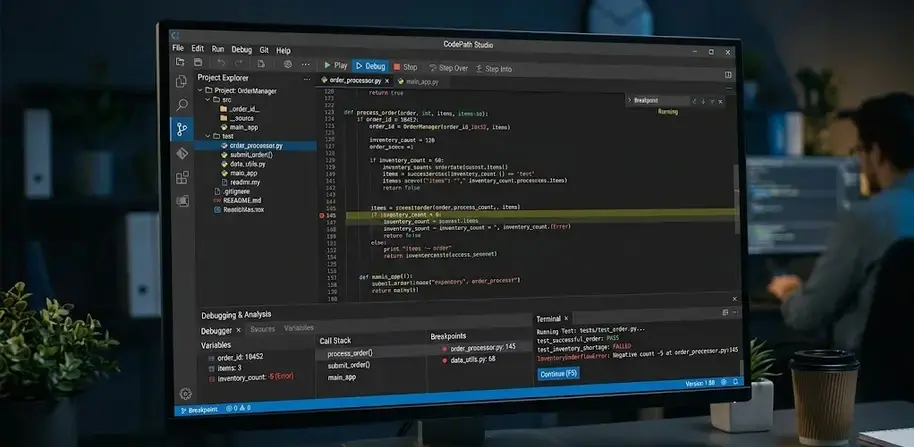
Software engineering debugging is the process of locating, diagnosing, and fixing errors, defects, or unexpected behavior in software systems. It helps developers ensure that applications perform according to design requirements and user expectations. Effective debugging reduces system failures, improves maintainability, and supports quality assurance efforts across modern software projects.

Key Takeaways

  • Software engineering debugging identifies and fixes software defects.
  • A structured debugging cycle improves problem resolution efficiency.
  • Debugging enhances reliability, security, and software quality.
  • Embedded systems require specialized debugging approaches.
  • Interactive debugging provides real-time insight into program execution.
  • Debugging tools help isolate faults and validate corrective actions.
  • Different debugging methods are suitable for different defect types.

What Is Debugging in Software Development?

Software engineering debugging involves investigating software defects, determining their root causes, and implementing corrective actions.

Common software defects include:

  • Syntax errors
  • Logic errors
  • Runtime errors
  • Integration failures
  • Performance bottlenecks

Example of Debugging

A banking application calculates incorrect account balances after transactions. Developers trace the issue to an arithmetic logic error, modify the calculation routine, test the fix, and verify that balances update correctly.

Many developers also explore related topics such as what is debugging in programming, what is debugging in C, and what is debugging in Python when learning debugging fundamentals.

Debugging Cycle in Software Engineering: Key Steps and Process

Software engineering debugging follows a structured process that helps teams resolve issues efficiently.

StepActivity
1Identify the defect
2Reproduce the issue
3Collect diagnostic data
4Analyze root causes
5Implement the fix
6Verify the correction
7Perform regression testing

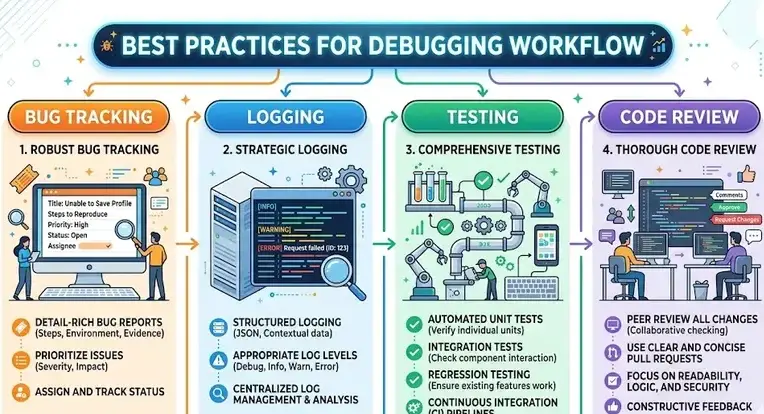
Typical Debugging Workflow

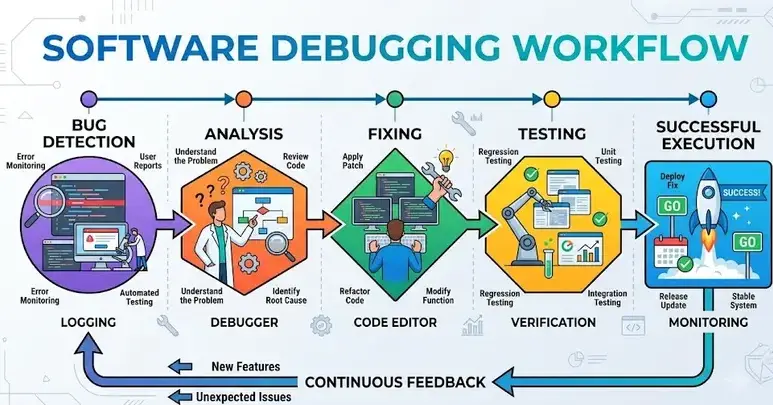
  1. Detect abnormal software behavior.
  2. Recreate the problem consistently.
  3. Review logs, traces, and system outputs.
  4. Isolate the faulty component or code section.
  5. Apply corrective changes.
  6. Test affected functionality.
  7. Document findings and resolutions.

Why Is Debugging Important in Software Engineering?

Software engineering debugging is essential because it improves software reliability and reduces operational risks.

Key Benefits

  • Enhances software quality
  • Improves user experience
  • Reduces system downtime
  • Strengthens application security
  • Supports compliance and quality standards
  • Lowers maintenance costs

Organizations commonly integrate debugging activities within quality management practices aligned with standards such as ISO 9001, software testing frameworks, and secure development methodologies.

Common Debugging Types

Debugging TypePurpose
Manual DebuggingHuman investigation of code behavior
Remote DebuggingAnalysis on external systems
Post-Mortem DebuggingExamination after crashes
Interactive DebuggingReal-time execution control
Automated DebuggingTool-assisted fault detection

Debugging Embedded Software: Common Challenges and Solutions

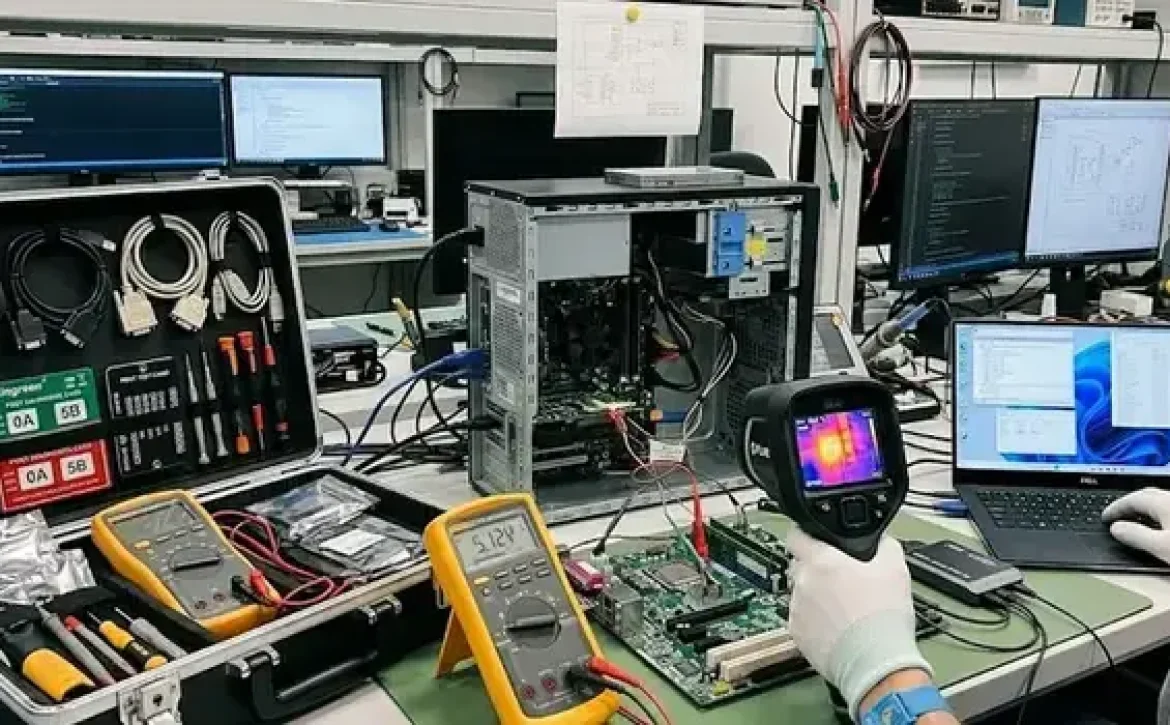
Debugging embedded software presents unique difficulties because software interacts directly with hardware components.

Common Challenges

  • Limited hardware resources
  • Real-time processing requirements
  • Hardware-software interactions
  • Device-specific environments
  • Timing and synchronization issues

Practical Solutions

  • Use hardware emulators and simulators
  • Implement detailed logging
  • Apply real-time tracing tools
  • Conduct hardware-in-the-loop testing
  • Perform systematic fault isolation

Embedded debugging is widely used in automotive systems, industrial automation, medical devices, and Internet of Things (IoT) applications.

Essential Debugging Tools for Embedded and System Software

Several software engineering debugging tools help developers identify and resolve defects efficiently.

Tool CategoryPrimary Purpose
Integrated DebuggersCode inspection and execution control
JTAG DebuggersHardware-level debugging
Trace AnalyzersRuntime monitoring
Log Management ToolsEvent analysis
ProfilersPerformance investigation

Examples include:

  • GDB (GNU Debugger)
  • LLDB
  • Visual Studio Debugger
  • JTAG-based debugging systems
  • Performance profiling utilities

These tools support both application-level and low-level system software debugging.

Debugging Methods and Interactive Debugging Systems

Different debugging methods are selected based on system complexity and defect characteristics.

Common Methods

  • Brute-force debugging
  • Backtracking
  • Cause elimination
  • Program slicing
  • Static analysis
  • Dynamic analysis

Interactive Debugging Systems

Interactive debugging systems allow developers to observe and control program execution in real time.

Key capabilities include:

  • Breakpoints
  • Watch variables
  • Stack inspection
  • Memory analysis
  • Step-by-step execution

These features help developers understand program behavior and isolate faults more efficiently.

Conclusion

Software engineering debugging combines structured processes, specialized tools, and proven diagnostic techniques to identify and resolve software defects effectively. Understanding defect classifications, debugging methods, and embedded-system challenges helps development teams build more reliable applications. For broader software quality practices, it is also useful to understand debugging in software engineering as part of the overall software development lifecycle.

FAQ

What is software engineering debugging?

Software engineering debugging is the process of finding, analyzing, and correcting defects that cause software to function incorrectly.

What are the main types of debugging?

Common types include manual debugging, interactive debugging, remote debugging, post-mortem debugging, and automated debugging.

What is debugging in programming?

Debugging in programming refers to identifying and fixing coding errors that prevent programs from producing expected results.

What is debugging in C?

Debugging in C involves locating syntax, runtime, memory, and logic errors within C language programs using debugging tools and testing techniques.

What is debugging in Python?

Debugging in Python is the process of detecting and correcting errors in Python applications through debugging tools, logging, and code analysis.

Sources

  • https://www.geeksforgeeks.org/software-engineering/software-engineering-debugging/
  • https://www.ranorex.com/blog/what-is-debugging-software-testing/
  • https://www.ibm.com/think/topics/debugging
  • https://www.meegle.com/en_us/topics/debugging/debugging-in-software-engineering
  • https://www.edureka.co/blog/what-is-debugging/
  • https://www.tricentis.com/learn/debugging
  • https://www.frugaltesting.com/blog/what-is-debugging-in-software-engineering
  • https://canvas.rku.ac.in/courses/3657/pages/debugging
  • https://www.scribd.com/presentation/910852023/SE-Presentation

READ MORE
Uncategorized
Umesh Kumar KhiriJune 1, 2026 0 Comments
Share article:TwitterFacebookLinkedin
7 Views
2 Likes

Debugging in Software Engineering: 7 Powerful Methods Every Developer Should Know

Debugging in software engineering is the process of locating, diagnosing, and fixing errors, defects, or unexpected behaviors in software systems. It is an essential part of the software development lifecycle because even well-designed applications can contain coding, logic, integration, or runtime errors. Effective debugging helps ensure software operates correctly, meets functional requirements, and delivers consistent performance across different environments.

Key Takeaways

  • Debugging is the process of finding and fixing software defects.
  • A structured debugging process improves efficiency and accuracy.
  • Interactive debugging enables real-time program inspection.
  • Multiple debugging methods are available for different problem types.
  • Embedded software debugging requires both hardware and software analysis.
  • Effective debugging improves reliability, security, and maintainability.
  • Debugging is essential throughout the software development lifecycle.

What Is Debugging in Software Development?

Debugging in software engineering refers to the structured investigation and correction of software defects, commonly called bugs.

A bug may result from:

  • Coding mistakes
  • Logic errors
  • Integration failures
  • Memory management issues
  • Incorrect user input handling

Debugging in Software Engineering Examples

ExampleDebugging Activity
Application crashAnalyze stack traces and logs
Incorrect calculationReview algorithms and formulas
Slow performanceProfile code execution
Security vulnerabilityTrace unsafe code paths

Many developers also explore related topics such as what is debugging in programming, debugging examples, and software testing to better understand software quality practices.

What Are the Steps in the Software Debugging Process?

Debugging in software engineering typically follows a structured workflow.

Common Debugging Steps

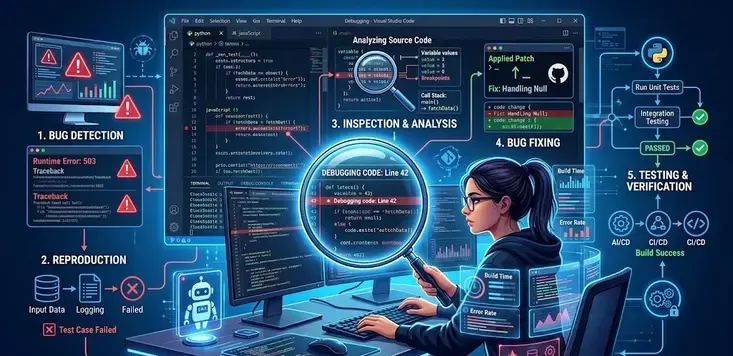
  1. Identify the defect.
  2. Reproduce the issue consistently.
  3. Isolate the root cause.
  4. Analyze affected components.
  5. Implement a corrective fix.
  6. Test the solution.
  7. Document findings and preventive measures.

Software Debugging Process Table

PhaseObjective
DetectionDiscover the error
ReproductionVerify the issue
DiagnosisFind the root cause
CorrectionApply the fix
VerificationConfirm resolution

Following a repeatable process reduces troubleshooting time and improves software quality.

Why Is Debugging Important in Software Engineering?

Debugging in software engineering helps organizations deliver reliable, secure, and maintainable software systems.

Key Benefits

  • Improves software reliability
  • Reduces system downtime
  • Enhances user experience
  • Supports regulatory compliance
  • Lowers maintenance costs
  • Increases software security

Industries such as healthcare, aviation, automotive systems, telecommunications, and finance rely on rigorous debugging practices because software failures can lead to significant operational risks.

What Is Interactive Debugging in System Software?

Interactive debugging is a method that allows developers to control program execution while observing internal program states in real time.

Common capabilities include:

  • Setting breakpoints
  • Inspecting variables
  • Executing code step-by-step
  • Monitoring memory usage
  • Evaluating runtime conditions

Interactive debugging is widely used in operating systems, compilers, and low-level software development.

What Are the Common Debugging Methods in System Software?

Several debugging methods are used depending on the software environment and defect type.

Common Methods

MethodPurpose
Brute Force DebuggingUses logs and output analysis
BacktrackingTraces execution backward from failure
Cause EliminationSystematically removes possible causes
Program SlicingFocuses on relevant code segments
Remote DebuggingDiagnoses issues on external systems

These techniques help engineers efficiently identify root causes in complex software environments.

How Is Embedded Software Debugging Performed?

Embedded software debugging focuses on software running directly on hardware devices such as microcontrollers and embedded processors.

Typical Embedded Debugging Tools

  • JTAG debuggers
  • In-circuit emulators
  • Logic analyzers
  • Serial monitoring tools
  • Hardware simulators

Challenges in Embedded Debugging

  • Limited hardware resources
  • Real-time processing requirements
  • Hardware-software interactions
  • Device-specific environments

Because embedded systems often operate in critical applications, debugging must address both software and hardware behavior simultaneously.

Conclusion

Debugging remains one of the most important activities in software engineering because it directly affects software reliability, performance, security, and maintainability. Understanding debugging methods, process stages, and specialized approaches such as embedded and interactive debugging helps development teams resolve defects more efficiently. For foundational concepts and terminology, readers may also benefit from exploring what is software debugging as part of a broader software quality framework.

FAQ

What is debugging in software engineering?

Debugging in software engineering is the process of identifying, analyzing, and correcting defects or errors in software applications to ensure proper functionality.

What is bug and debugging?

A bug is a defect or flaw in software that causes incorrect behavior. Debugging is the process of locating and fixing that defect.

What are the types of debugging?

Common types include brute force debugging, backtracking, cause elimination, program slicing, remote debugging, and interactive debugging.

What is debugging in engineering?

Debugging in engineering is the systematic investigation and correction of faults in software, hardware, or integrated systems to achieve expected performance.

What tools are used for debugging?

Common tools include debuggers, log analyzers, profilers, JTAG interfaces, integrated development environment (IDE) debuggers, and monitoring utilities.

Sources

  • https://www.geeksforgeeks.org/software-engineering/software-engineering-debugging/
  • https://www.edureka.co/blog/what-is-debugging/
  • https://www.ibm.com/think/topics/debugging
  • https://www.meegle.com/en_us/topics/debugging/debugging-in-software-engineering
  • https://www.theknowledgeacademy.com/blog/what-is-debugging/
  • https://www.guvi.in/blog/debugging-in-software-development/
  • https://www.tricentis.com/learn/debugging
READ MORE
Uncategorized
Umesh Kumar KhiriJune 1, 2026 0 Comments
Share article:TwitterFacebookLinkedin
6 Views
3 Likes

What Is Software Debugging? 7 Powerful Insights Into Error Detection and Fixing

Software debugging is the process of finding, diagnosing, and fixing defects, errors, or unexpected behaviors in software applications. It is a critical activity throughout the software development lifecycle because software defects can affect functionality, performance, security, and user experience. Understanding how debugging works helps developers create more reliable and maintainable systems.

Key Takeaways

  • Software debugging identifies and fixes software defects.
  • Debugging supports software reliability, security, and performance.
  • Testing finds defects, while debugging resolves them.
  • Interactive debugging systems provide real-time program analysis.
  • Embedded software debugging addresses hardware-related challenges.
  • Specialized tools help developers locate and correct faults efficiently.
  • A structured debugging process improves software quality and maintainability.

What Is Debugging in Software Development?

Software debugging in software development refers to the structured process of locating and correcting programming errors that prevent software from functioning as intended.

Common software defects include:

  • Syntax errors
  • Logic errors
  • Runtime errors
  • Integration issues
  • Memory-related problems

A typical debugging workflow includes:

  1. Identifying the problem
  2. Reproducing the error
  3. Analyzing the root cause
  4. Implementing a fix
  5. Testing the solution
  6. Verifying system stability

Debugging is used across desktop applications, web platforms, mobile apps, cloud systems, and embedded devices.

Software Debugging Definition

Software debugging is defined as the systematic examination of software code and execution behavior to detect, isolate, and correct defects that cause incorrect or unexpected results.

ComponentPurpose
Error DetectionIdentifies software faults
Fault IsolationLocates the source of the problem
Root Cause AnalysisDetermines why the error occurred
Error CorrectionApplies code modifications
Validation TestingConfirms the issue is resolved

Software debugging is commonly associated with programming, software testing, quality assurance, and system maintenance activities.

What Is Debugging in Software Testing?

Software debugging in software testing occurs after a defect has been discovered during testing activities. While testing identifies the existence of a problem, debugging determines its exact cause and resolves it.

Testing vs. Debugging

ActivityPrimary Goal
TestingDetect defects
DebuggingFix defects
ValidationVerify corrections
Regression TestingEnsure no new defects appear

People often discuss debugging alongside software testing, code review, defect tracking, and quality assurance practices because these activities work together to improve software quality.

Debugging Methods in System Software

System software often requires specialized debugging techniques due to its interaction with hardware and operating systems.

Common debugging methods include:

  • Breakpoint debugging
  • Trace-based debugging
  • Log analysis
  • Memory inspection
  • Static code analysis
  • Dynamic analysis

These methods help developers investigate issues within operating systems, device drivers, compilers, and utility software.

Example of Software Debugging

A banking application calculates interest incorrectly because a percentage formula uses an incorrect variable.

Debugging process:

  • Tester identifies incorrect calculations.
  • Developer reproduces the issue.
  • Code inspection reveals the wrong variable.
  • Formula is corrected.
  • Testing confirms accurate calculations.

This illustrates what is software debugging with example in a practical business environment.

What Is Interactive Debugging Systems in System Software?

Interactive debugging systems allow developers to monitor and control program execution in real time.

Key capabilities include:

  • Setting breakpoints
  • Executing code step-by-step
  • Monitoring variables
  • Inspecting memory usage
  • Evaluating expressions during execution

Interactive debuggers significantly reduce troubleshooting time and improve diagnostic accuracy.

Debugging Embedded Software

Embedded software debugging involves identifying faults in software running on dedicated hardware devices.

Challenges include:

  • Limited hardware resources
  • Real-time processing requirements
  • Hardware-software interactions
  • Device-specific environments

Common industries using embedded debugging:

  • Automotive systems
  • Medical devices
  • Industrial automation
  • Consumer electronics
  • Aerospace systems

Common Debugging Tools

Several debugging tools support software analysis and defect correction:

  • GNU Debugger (GDB)
  • Visual Studio Debugger
  • Eclipse Debugger
  • WinDbg
  • LLDB

These tools provide advanced capabilities for code inspection, execution monitoring, and performance analysis.

Conclusion

Software debugging remains an essential discipline for maintaining reliable, secure, and efficient software systems. By understanding debugging classifications, methods, tools, and testing relationships, organizations can improve software quality and reduce operational risks. Effective software debugging practices help ensure that applications continue to perform correctly as systems become increasingly complex.

FAQ

What is software debugging and how it works?

Software debugging is the process of identifying, analyzing, and correcting defects in software. It works through error detection, root cause analysis, code correction, and validation testing.

What is software debugging in software testing?

In software testing, debugging is the activity performed after a defect is detected. Its purpose is to determine the cause of the defect and fix it.

What is software debugging with example?

An example is correcting an incorrect calculation formula in a financial application after testing reveals inaccurate results.

What is debugging in programming?

Debugging in programming is the process of locating and fixing coding errors that cause a program to behave unexpectedly.

Define debugging in software testing.

Debugging in software testing is the systematic investigation and correction of defects identified during testing activities.

Sources

  • https://www.geeksforgeeks.org/software-engineering/software-engineering-debugging/
  • https://aws.amazon.com/what-is/debugging/
  • https://www.ibm.com/think/topics/debugging
  • https://www.ranorex.com/blog/what-is-debugging-software-testing/
  • https://www.coursera.org/in/articles/what-is-debugging
  • https://www.sciencedirect.com/topics/computer-science/software-debugging
  • https://www.theknowledgeacademy.com/blog/what-is-debugging/
  • https://www.meegle.com/en_us/topics/debugging/debugging-in-software-engineering
  • https://www.tricentis.com/learn/debugging
  • https://www.edureka.co/blog/what-is-debugging/
READ MORE
Uncategorized
Umesh Kumar KhiriMay 23, 2026 0 Comments
Share article:TwitterFacebookLinkedin
14 Views
2 Likes

best way to debug software: 9 Proven Methods for Faster Error Detection

The best way to debug software is to follow a systematic process that identifies the root cause of code errors, performance failures, or unexpected behavior. Debugging is a core practice in software engineering because it improves application stability, security, and maintainability. Without structured debugging methods, developers risk releasing unstable software that affects users, business operations, and compliance requirements.

Key Takeaways

  • The best way to debug software follows a structured step-by-step process
  • Testing detects issues, while debugging resolves them
  • Professional debugging tools improve troubleshooting accuracy
  • Embedded systems require specialized debugging methods
  • Repeatable debugging workflows reduce software maintenance costs
  • Log analysis and automated testing improve defect resolution speed

Software Debugging Techniques and Methods

Software Testing vs Debugging

The best way to debug software begins with understanding the difference between testing and debugging. Software testing detects failures, while debugging identifies and fixes the cause of those failures.

ActivityPurposeOutput
Software TestingFinds defectsFailed test cases
DebuggingResolves defectsCorrected code

Common debugging techniques include:

  • Backtracking: Reviewing executed code paths to locate failures
  • Cause elimination: Removing possible error sources systematically
  • Program slicing: Analyzing only the code relevant to the defect
  • Rubber duck debugging: Explaining logic step-by-step to uncover issues
  • Log analysis: Reviewing runtime logs for abnormal behavior

Developers often discuss related topics such as debugging techniques in software testing, debugging guidelines in software engineering, and debugging code examples when improving troubleshooting workflows.

What are the most effective debugging techniques?

The best way to debug software efficiently is to combine automated testing with structured debugging methods.

Recommended techniques include:

  1. Reproduce the error consistently
  2. Review logs and stack traces
  3. Isolate the faulty module
  4. Use breakpoints and step execution
  5. Validate assumptions with test cases
  6. Apply fixes incrementally
  7. Retest after correction

Industry teams commonly use unit testing frameworks alongside debuggers to reduce regression risks.

Hardware and Software Debugging Tools

Software Used to Debug C++ Code

The best way to debug software written in C++ often depends on the operating system, compiler, and runtime environment.

Popular debugging tools include:

ToolPrimary Use
GDBLinux and embedded debugging
LLDBmacOS debugging
Visual Studio DebuggerWindows application debugging
ValgrindMemory leak detection
WinDbgKernel and system-level debugging

For developers searching for the best way to debug software Mac systems, LLDB and Xcode debugging tools are commonly used for native Apple development.

What debugging tools are commonly used?

The best way to debug software in professional environments usually involves combining multiple tools.

Common categories include:

  • Static analysis tools
  • Integrated debuggers
  • Performance profilers
  • Memory analyzers
  • Log monitoring systems
  • Automated testing frameworks

Embedded systems debugging may additionally require hardware probes, oscilloscopes, and firmware tracing utilities.

Software Testing, Validation, and Debugging Process

Testing and Debugging in Software Engineering

The best way to debug software in enterprise environments is through a repeatable validation process aligned with software engineering standards.

A standard debugging workflow includes:

StepDescription
Error DetectionIdentify abnormal behavior
ReproductionTrigger the issue consistently
IsolationNarrow down affected components
DiagnosisDetermine root cause
CorrectionModify faulty logic
VerificationConfirm successful resolution

Many organizations follow debugging guidelines influenced by ISO software quality models and secure development lifecycle practices.

How does debugging improve software quality?

The best way to debug software contributes directly to:

  • Better system stability
  • Reduced production failures
  • Improved security
  • Faster maintenance cycles
  • Higher customer trust

Structured debugging also improves long-term maintainability by documenting recurring defects and correction procedures.

What are debugging techniques in embedded systems?

The best way to debug software in embedded systems includes both hardware and firmware analysis.

Embedded debugging methods include:

  • JTAG debugging
  • Real-time tracing
  • Register inspection
  • Signal monitoring
  • Firmware logging

These techniques help engineers diagnose timing issues, hardware communication failures, and low-level memory problems.

Conclusion

The best way to debug software is to apply structured troubleshooting methods supported by testing, logging, and professional debugging tools. A repeatable debugging framework improves reliability, shortens development cycles, and reduces operational risk across software systems.

Developers seeking advanced troubleshooting workflows often continue with related resources such as best pc debugging tools or software to compare modern debugging environments and diagnostic platforms.

FAQ

What is the best way to debug software?

The best way to debug software is to reproduce the issue, isolate the faulty code, analyze logs, apply fixes carefully, and retest systematically.

What is the difference between testing and debugging?

Testing identifies defects, while debugging finds and fixes the root cause of those defects.

Which debugging tool is best for C++ development?

Common C++ debugging tools include GDB, LLDB, Visual Studio Debugger, and Valgrind.

Why is debugging important in software engineering?

Debugging improves software reliability, security, performance, and maintainability by resolving defects before deployment.

What are common debugging techniques?

Common techniques include backtracking, log analysis, cause elimination, breakpoints, program slicing, and automated test validation.

Sources

  • https://medium.com/javarevisited/debugging-tips-and-tricks-a-comprehensive-guide-8d84a58ca9f2
  • https://www.disher.com/blog/software-debugging-strategies/
  • https://www.reddit.com/r/learnprogramming/comments/1osf2u3/what_are_the_most_effective_ways_to_debug_code_as/
  • https://www.tricentis.com/learn/debugging
  • https://www.geeksforgeeks.org/software-engineering/software-engineering-debugging/
  • https://wearebrain.com/blog/10-effective-debugging-techniques-for-developers/
  • https://www.oreilly.com/library/view/effective-debugging-66/9780134394909/
  • https://softwareengineering.stackexchange.com/questions/10735/how-to-most-effectively-debug-code
  • https://www.meegle.com/en_us/topics/debugging/debugging-best-practices
READ MORE
Uncategorized
Umesh Kumar KhiriMay 23, 2026 0 Comments
Share article:TwitterFacebookLinkedin
12 Views
1 Like

best pc debugging tools or software: 10 Powerful Solutions for Windows Developers

Best pc debugging tools or software are programs designed to detect software faults, inspect runtime behavior, and simplify troubleshooting on Windows PCs and development environments. They help developers isolate memory leaks, breakpoint failures, driver conflicts, and performance bottlenecks. Modern debugging platforms also support multi-threaded analysis, reverse engineering, and cloud-connected testing workflows for enterprise-scale applications.

Key Takeaways

  • Best pc debugging tools or software help detect runtime, memory, and system-level errors.
  • WinDbg is widely used for Windows kernel debugging.
  • X64dbg supports reverse engineering and malware analysis.
  • C++ debugging requires memory inspection and thread analysis capabilities.
  • USB debugging software assists with Android and hardware diagnostics.
  • Tool selection should match platform compatibility and project complexity.

Best PC Debugging Tools for Faster Error Detection

Best pc debugging tools or software improve troubleshooting speed by offering live code inspection, breakpoint management, and crash analysis capabilities. Commonly used tools include:

ToolPrimary UsePlatform Support
WinDbgKernel and driver debuggingWindows
X64dbgReverse engineering and malware analysisWindows
GDBC and C++ debuggingCross-platform
Visual Studio DebuggerApplication and .NET debuggingWindows
LLDBHigh-performance native debuggingCross-platform

Key advantages include:

  • Real-time variable inspection
  • Stack trace visualization
  • Memory usage tracking
  • Remote debugging support
  • Multi-thread execution monitoring

Developers also frequently compare debugging tools in software testing, debugging tools for Android, and best debugger for reverse engineering solutions when selecting enterprise-grade platforms.

Essential Features to Look for in PC Debugging Software

Best pc debugging tools or software should provide advanced diagnostics while maintaining compatibility with modern operating systems and programming frameworks.

Software Used to Debug C++ Code

C++ debugging requires precise memory management inspection and breakpoint handling. Commonly used tools include:

  • GDB for Linux and cross-platform debugging
  • Visual Studio Debugger for Windows-based C++ projects
  • LLDB for optimized native code analysis

Important C++ debugging features include:

  1. Symbol resolution
  2. Pointer tracking
  3. Heap corruption detection
  4. Thread synchronization analysis

USB Debugging Software for Windows PCs

USB debugging software helps developers diagnose device communication issues between PCs and connected hardware.

Common use cases include:

  • Android device testing
  • Driver installation troubleshooting
  • Firmware communication monitoring
  • Peripheral hardware diagnostics

Widely used utilities include:

  • ADB
  • WinDbg
  • Windows Device Manager diagnostic tools

What Is the Debugging Process in Software Testing?

The debugging process in software testing follows a structured workflow:

  1. Reproduce the software issue
  2. Isolate the faulty code or process
  3. Analyze logs and memory behavior
  4. Apply corrective modifications
  5. Retest the application
  6. Document the resolution

This process supports quality assurance standards commonly used in enterprise software development and regulated environments.

How to Choose the Right Debugging Software for Windows PCs

Best pc debugging tools or software vary depending on technical requirements, programming language support, and security needs.

Consider these selection criteria:

RequirementRecommended Tool Type
Driver debuggingWinDbg
Reverse engineeringX64dbg
Android diagnosticsADB
Enterprise application testingVisual Studio Debugger
Open-source debuggingGDB

When evaluating best PC debugging tools or software free, organizations should verify:

  • Windows compatibility
  • Active maintenance support
  • Security update frequency
  • Integration with CI/CD systems
  • Hardware resource requirements

Free debugging tools may offer strong functionality for small development teams, while enterprise-grade platforms typically include automation and collaboration features.

Conclusion

Best pc debugging tools or software play a critical role in software reliability, driver validation, and system performance optimization across Windows environments. Selecting the correct debugger depends on programming language support, hardware compatibility, and analysis depth required for the project.

Organizations managing both desktop and mobile ecosystems often also evaluate related solutions such as best mobile app debugging software to maintain consistent testing and troubleshooting workflows across platforms.

FAQ

What are the best PC debugging tools for Windows?

Common Windows debugging tools include WinDbg, Visual Studio Debugger, and X64dbg.

Is X64dbg suitable for reverse engineering?

Yes. X64dbg is widely used for reverse engineering, malware analysis, and low-level application inspection.

Which debugging software is best for C++ development?

GDB, LLDB, and Visual Studio Debugger are commonly used for C++ debugging.

What is the purpose of WinDbg?

WinDbg is designed for kernel-mode debugging, crash dump analysis, and Windows driver diagnostics.

Are free PC debugging tools reliable?

Many open-source debugging tools provide reliable diagnostics for development and testing. However, enterprise environments may require commercial tools with advanced automation and support.

Sources

  • https://conclusive.tech/glossary/debugging-tools-the-best/
  • https://www.devopsschool.com/blog/top-10-debugging-tools-in-2025-features-pros-cons-comparison/
  • https://javascript.plainenglish.io/top-7-debugging-tools-every-developer-should-master-in-2025-fe09af885d1c
  • https://ubiminds.com/en-us/best-debugging-tools-2/
  • https://thectoclub.com/tools/best-debugging-tools/
  • https://wearebrain.com/blog/best-debugging-tools-for-software-developers/
  • https://medium.com/@akashnagpal112/24-best-debugging-tools-for-developers-in-2026-d5e34cee5880
  • https://www.testmuai.com/blog/best-debugging-tools/
  • https://learn.microsoft.com/en-us/windows-hardware/drivers/debugger/debugger-download-tools
READ MORE
Uncategorized
Umesh Kumar KhiriMay 23, 2026 0 Comments
Share article:TwitterFacebookLinkedin
11 Views
2 Likes

Best Mobile App Debugging Software: 10 Powerful Tools for Faster Testing

Best mobile app debugging software refers to platforms and utilities used to detect, analyze, and fix errors in mobile applications during development and testing. These tools improve application stability, security, and performance across Android, iOS, and hybrid environments. Mobile debugging software is widely used in enterprise app development, quality assurance workflows, and DevOps testing pipelines where rapid issue resolution is critical.

Key Takeaways

  • Best mobile app debugging software supports Android, iOS, and hybrid applications.
  • Debugging tools help identify crashes, memory leaks, and performance issues.
  • Free tools are suitable for individual testing workflows.
  • Professional platforms provide cloud monitoring and team collaboration features.
  • USB debugging and runtime analysis remain essential for mobile diagnostics.

Best Mobile App Debugging Software Tools

The best mobile app debugging software includes integrated debugging environments, cloud-based monitoring platforms, and runtime inspection tools. These solutions help developers track crashes, memory leaks, network failures, and UI rendering issues.

ToolPrimary UsePlatform Support
Android StudioAndroid debugging and profilingAndroid
Xcode DebuggeriOS debugging and simulator testingiOS
AppSpectorRemote debugging and logsAndroid, iOS
ZipySession replay and error monitoringCross-platform
Firebase CrashlyticsCrash reportingAndroid, iOS
Charles ProxyAPI and network debuggingPC, Mobile

Common debugging capabilities include:

  • Real-time log monitoring
  • Memory and CPU profiling
  • API request inspection
  • Crash analytics
  • Remote device testing
  • Breakpoint debugging

Developers often compare best mobile app debugging software free tools with enterprise platforms that include cloud testing, automation, and security auditing features.

Software to Debug JavaScript

JavaScript debugging software is commonly used in React Native, Ionic, and hybrid mobile frameworks.

Popular tools include:

  1. Chrome DevTools
  2. Visual Studio Code Debugger
  3. React Native Debugger
  4. Safari Web Inspector

These tools support:

  • Console inspection
  • Source mapping
  • Runtime variable tracking
  • Network request analysis

Free and Professional Mobile App Debugging Software

Best mobile app debugging software for Android and iOS is available in both free and enterprise editions. Free tools are suitable for individual developers, while professional suites support large-scale deployment testing and compliance workflows.

Free Mobile Debugging Tools

  • Android Debug Bridge (ADB)
  • Logcat
  • Chrome DevTools
  • Xcode Instruments

Professional Mobile Debugging Platforms

  • AppSpector
  • Instabug
  • New Relic Mobile
  • Sentry

Professional platforms typically provide:

  • Centralized crash reporting
  • User session replay
  • Cloud device testing
  • Team collaboration dashboards
  • Automated alerts

A related area often discussed alongside debugging tools includes mobile app testing frameworks, crash analytics software, and performance monitoring systems.

USB Debugging Software for Windows and PC

USB debugging software enables direct communication between mobile devices and desktop systems for testing and diagnostics.

Common PC debugging utilities include:

SoftwareFunction
ADB ToolsAndroid device communication
Samsung OdinFirmware debugging
Minimal ADB and FastbootDevice testing
Android SDK Platform ToolsDeveloper debugging

Best mobile app debugging software for PC frequently integrates with IDEs to simplify device deployment and emulator testing.

Mobile App Debugging Techniques and Testing Methods

Best mobile app debugging software supports multiple testing and debugging techniques used in modern software engineering environments.

Common Debugging Methods

  • Static code analysis
  • Runtime debugging
  • Memory profiling
  • API validation
  • Emulator testing
  • Device compatibility testing

Testing Workflow Example

  1. Reproduce the issue
  2. Capture logs and stack traces
  3. Analyze runtime behavior
  4. Apply fixes
  5. Validate through regression testing

Industry practices often follow Agile testing cycles combined with CI/CD validation pipelines to reduce deployment failures.

Software Used to Debug C++ Code

C++ debugging tools are important for game engines, embedded mobile systems, and native Android development.

Widely used solutions include:

  • GNU Debugger (GDB)
  • LLDB
  • Visual Studio Debugger
  • CLion Debugger

These tools support:

  • Breakpoint inspection
  • Thread analysis
  • Memory allocation tracking
  • Native code debugging

Best mobile app debugging software ios environments commonly integrate LLDB within Xcode for native application testing.

Conclusion

Best mobile app debugging software improves application reliability through structured testing, crash monitoring, and runtime analysis across Android, iOS, and PC environments. As mobile applications become more complex, developers increasingly rely on integrated debugging ecosystems that combine performance monitoring, automated testing, and device compatibility validation.

Organizations evaluating cross-platform development environments may also explore best mac debugging software to support broader desktop and mobile debugging workflows.

FAQ

What is mobile app debugging software?

Mobile app debugging software is used to detect, analyze, and fix errors in Android and iOS applications during development and testing.

Which is the best mobile app debugging software for Android?

Android Studio, ADB, and Firebase Crashlytics are widely used for Android debugging and crash analysis.

Is there free mobile app debugging software available?

Yes. Android Studio, Logcat, Chrome DevTools, and Xcode provide free debugging capabilities for mobile developers.

What software is used to debug C++ mobile applications?

Common C++ debugging tools include GDB, LLDB, Visual Studio Debugger, and CLion Debugger.

Why is USB debugging important in mobile testing?

USB debugging allows direct device communication for app installation, diagnostics, log analysis, and firmware testing.

Sources

  • https://bestmobileappdebuggingsoftware.com/
  • https://www.appspector.com/blog/best-mobile-app-debugging-tool
  • https://www.softobotics.org/blogs/top-testing-and-debugging-tools-for-mobile-app-development/
  • https://www.g2.com/categories/mobile-app-debugging
  • https://www.iubenda.com/en/blog/top-5-mobile-app-development-tools-for-developers-and-beginners/
  • https://www.zipy.ai/blog/top-debugging-tools-for-mobile
  • https://play.google.com/store/apps/details?id=com.legendsoftware.appdebug&hl=en_IN
  • https://deftsoft.com/10-android-mobile-app-development-tools/
  • https://getlatka.com/companies/industries/i-mobile-app-debugging-tools
READ MORE
Uncategorized
Umesh Kumar KhiriMay 22, 2026 0 Comments
Share article:TwitterFacebookLinkedin
11 Views
1 Like

Best Mac Debugging Software: 7 Powerful Tools for Faster Issue Detection

Best mac debugging software refers to applications and utilities designed to detect, analyze, and resolve coding, runtime, hardware, and system-level errors on macOS devices. These tools are important for improving software stability, application security, and performance efficiency across modern development environments. Mac developers commonly use debugging platforms for JavaScript, C++, embedded systems, and network diagnostics during software validation and testing.

Key Takeaways

  • Best mac debugging software supports testing, tracing, validation, and runtime diagnostics.
  • LLDB and GDB remain standard tools for low-level Mac debugging.
  • JavaScript and API debugging commonly rely on VS Code and Fiddler Everywhere.
  • Embedded developers use USB debugging and firmware inspection tools on macOS.
  • Memory analysis and network tracing are essential for application stability.

Best Free and Professional Debugging Software for Mac

The best mac debugging software includes both open-source and enterprise-grade tools designed for performance analysis, breakpoint debugging, memory tracing, and protocol inspection.

Software Testing vs Debugging in Mac Development

Software testing verifies whether an application behaves correctly, while debugging identifies and fixes the root cause of failures.

ProcessPrimary GoalCommon Mac Tools
Software TestingDetect failuresXCTest, Selenium
DebuggingFix failuresLLDB, GDB, Fiddler Everywhere

Key industry practices include:

  • Unit testing before deployment
  • Runtime exception tracing
  • Static and dynamic code analysis
  • Continuous integration validation

Apple developers frequently use LLDB within Xcode because it integrates directly with macOS application frameworks.

Best Software to Debug JavaScript and C++ Code on Mac

Best mac debugging software for JavaScript and C++ development focuses on breakpoint inspection, memory management, and runtime tracing.

Popular tools include:

  1. LLDB
    • Native Apple debugger
    • Supports Swift, C++, Objective-C
    • Integrated with Xcode
  2. Visual Studio Code
    • JavaScript debugging extensions
    • Node.js runtime inspection
    • Cross-platform support
  3. GDB
    • GNU-based low-level debugger
    • Common in embedded and kernel projects
  4. Fiddler Everywhere
    • HTTP and API debugging
    • Network traffic inspection
    • TLS and proxy monitoring

Many developers discussing best mac debugging software reddit recommendations also compare memory profilers, terminal debuggers, and packet analyzers for backend diagnostics.

Hardware and Software Debugging Tools for Embedded and Mac Development

Best mac debugging software is also used in embedded systems, firmware analysis, and device-level diagnostics.

USB Debugging Software for Windows and Mac Devices

USB debugging tools allow developers to communicate with external hardware, Android devices, and embedded controllers.

Common debugging environments include:

  • Android Debug Bridge (ADB)
  • OpenOCD
  • J-Link Debugger
  • PlatformIO

Important hardware debugging features:

  • Serial communication monitoring
  • Firmware flashing
  • Real-time breakpoint handling
  • Device log inspection

Mac developers working with ARM-based systems often use virtualization or cross-compilation environments to support additional debugging frameworks.

A related area frequently discussed includes embedded testing software, Android debugging utilities, and cross-platform device monitoring tools.

What Features Define Professional Mac Debugging Software?

Professional debugging platforms usually provide:

FeaturePurpose
Breakpoint ManagementPause execution at target code
Stack TracingAnalyze execution flow
Memory InspectionDetect leaks and corruption
Network MonitoringDebug API and traffic issues
Crash ReportingDiagnose runtime failures

Enterprise development teams also prioritize:

  • CI/CD integration
  • Security compliance testing
  • Remote debugging support
  • Multi-language compatibility

Software Testing, Validation, and Debugging Techniques on Mac

Best mac debugging software supports validation procedures that improve reliability, application uptime, and deployment safety.

Which Debugging Techniques Improve Mac Application Stability?

Several debugging methods are widely used in professional macOS development.

Static Debugging

Analyzes source code without executing the application.

Dynamic Debugging

Observes runtime behavior during execution.

Memory Debugging

Detects leaks, pointer corruption, and allocation failures.

Network Debugging

Tracks HTTP requests, API latency, and packet-level communication.

Developers often combine automated testing with live debugging sessions to reduce production failures and improve software maintainability.

Conclusion

Best mac debugging software continues evolving alongside macOS development, embedded systems engineering, and cloud-connected applications. Selecting the right debugging platform depends on programming language support, hardware requirements, validation workflows, and runtime analysis capabilities. Developers researching broader diagnostic tools may also compare solutions discussed in best free debugging software for additional cross-platform debugging options.

FAQs

What is the best mac debugging software for beginners?

Xcode with LLDB is commonly recommended because it integrates directly with macOS development tools and supports multiple programming languages.

Which Mac debugger is best for C++ development?

LLDB and GDB are widely used for C++ debugging because they support low-level memory inspection and breakpoint analysis.

Can Mac debugging software detect memory leaks?

Yes. Tools such as Instruments and LLDB can identify memory leaks, allocation problems, and runtime corruption issues.

Is USB debugging supported on macOS?

Yes. macOS supports USB debugging through Android Debug Bridge, OpenOCD, and several embedded development frameworks.

What is the difference between testing and debugging?

Testing identifies failures in software behavior, while debugging locates and resolves the technical cause of those failures.

Sources

  • https://www.macupdate.com/explore/categories/developer-tools/debugging
  • https://sourceforge.net/software/debugging/mac/
  • https://www.reddit.com/r/asm/comments/1o2gx0f/recommended_tools_for_developing_and_debugging/
  • https://www.techjockey.com/category/debugging-software/mac?srsltid=AfmBOoqTzF1SwjiwCwH-O_ElDY7qugCwLyrazZoZo-nRqtNgzOfYIfS-
  • https://www.trustradius.com/categories/debugging?os=mac
  • https://www.telerik.com/fiddler/fiddler-everywhere
  • https://polivka-pavel.medium.com/the-most-awesome-tools-i-use-on-my-mac-a-developers-guide-f05d185673b7
  • https://en.softonic.com/downloads/debugging-for-mac/7
READ MORE
Uncategorized
Umesh Kumar KhiriMay 22, 2026 0 Comments
Share article:TwitterFacebookLinkedin
12 Views
1 Like

Best Free Debugging Software: 9 Powerful Tools for Developers

Best free debugging software refers to tools that detect, analyze, and resolve software defects during development and testing. These platforms provide features such as breakpoint analysis, memory inspection, API tracing, stack monitoring, and real-time execution tracking. Developers use debugging software to improve application stability, reduce runtime errors, and validate code behavior across multiple environments.

Key Takeaways

  • Best free debugging software helps detect and fix runtime and logic errors.
  • API debugging tools analyze HTTP requests and server responses.
  • USB debugging software supports Android device diagnostics.
  • x64dbg is widely used for reverse engineering and binary analysis.
  • JavaScript, Python, Java, and C++ all require language-specific debugging environments.
  • Hardware and software debugging tools improve application stability and performance.

Best Free Debugging Software for Developers

Best free debugging software for developers includes integrated debuggers, API inspection tools, and runtime analyzers designed for multiple programming languages.

ToolPrimary UsePlatform
FiddlerHTTP and API debuggingWindows
x64dbgReverse engineering and binary debuggingWindows
GDBGNU source-level debuggingLinux, macOS
Visual Studio Debugger.NET and C++ debuggingWindows
Chrome DevToolsJavaScript debuggingBrowser

Software Testing vs Debugging

Software testing identifies defects, while debugging locates and fixes the root cause of those defects.

Testing activities include:

  • Functional testing
  • Integration testing
  • Regression testing

Debugging activities include:

  • Breakpoint analysis
  • Variable tracing
  • Stack inspection
  • Memory analysis

Most enterprise development workflows combine both processes within continuous integration environments.

Software Used to Debug C++ Code

Common software used to debug C++ code includes:

  • GDB
  • LLDB
  • Visual Studio Debugger
  • Code::Blocks Debugger

These tools support:

  • Breakpoints
  • Pointer tracking
  • Heap analysis
  • Thread debugging

Hardware and Software Debugging Tools

Best free debugging software also supports hardware diagnostics, embedded systems, and firmware validation.

USB Debugging Software for Windows and PC

USB debugging software for Windows and PC enables communication between Android devices and development systems.

Popular tools include:

  1. Android Debug Bridge (ADB)
  2. Samsung Odin Tool
  3. Minimal ADB and Fastboot

These tools help developers:

  • Transfer logs
  • Flash firmware
  • Access developer mode
  • Diagnose Android boot issues

Best free debugging software for PC environments often integrates USB debugging with emulator testing and driver monitoring.

A related area often discussed alongside debugging tools includes API monitoring software, network packet analyzers, and automated testing frameworks.

What Makes a Good API Debugging Tool?

An effective API debugging tool should provide:

  • Request and response inspection
  • Header validation
  • Authentication testing
  • Traffic replay
  • JSON formatting

Tools such as Fiddler and Postman are commonly used for REST API debugging and HTTP traffic analysis.

JavaScript, Python, and Java Debug Software Options

Best free debugging software for programming languages varies based on runtime environment and application architecture.

Which Tools Help Debug JavaScript Applications?

JavaScript debugging commonly uses:

  • Chrome DevTools
  • Firefox Developer Tools
  • VS Code Debugger

These tools support:

  • DOM inspection
  • Console logging
  • Source maps
  • Performance profiling

What Are the Best Python and Java Debugging Tools?

For Python:

  • PyCharm Community Edition
  • pdb
  • VS Code Python Debugger

For Java:

  • Eclipse Debugger
  • IntelliJ IDEA Community Edition
  • NetBeans

These environments support step execution, variable inspection, and multithreaded debugging.

Which Debuggers Are Best for Reverse Engineering?

Best debugger for reverse engineering tasks includes:

  • x64dbg
  • OllyDbg
  • Ghidra Debugger

These tools are widely used in malware analysis, binary inspection, and vulnerability research.

Conclusion

Best free debugging software improves software reliability, accelerates issue resolution, and supports secure application development across desktop, mobile, and embedded systems. Selecting the correct debugger depends on language compatibility, runtime visibility, hardware support, and protocol analysis requirements. Developers evaluating advanced coding workflows may also compare tools discussed in best free coding debugging software resources for broader development coverage.

FAQ

What is the best software for debugging?

The best software for debugging depends on the use case. Visual Studio Debugger, GDB, Fiddler, and x64dbg are widely used for application, API, and reverse engineering tasks.

Is x64dbg free?

Yes. x64dbg is a free and open-source debugger designed for Windows applications and reverse engineering.

Which IDE is best for debugging?

Visual Studio, IntelliJ IDEA, and PyCharm are considered strong IDEs for debugging because they include integrated runtime analysis and breakpoint management.

Is the HTTP debugger free?

Some HTTP debugging tools offer free versions. Fiddler Classic and several browser-based debugging tools are available without cost.

What is the best debugging app for Android?

Android Studio with ADB is commonly used for Android debugging because it supports log analysis, emulator testing, and device inspection.

Sources

  • https://www.moesif.com/blog/technical/api-tools/The-Best-Free-REST-API-Debugging-Tools-For-Developing-APIs/
  • https://thectoclub.com/tools/best-debugging-tools/
  • https://sourceforge.net/directory/debuggers/
  • https://www.techjockey.com/category/debugging-software/free?srsltid=AfmBOoo_tPxzgBONm7jOai6RopS6YvObovYvoZtxI_ir_MgI2SwbVe8m
  • https://javascript.plainenglish.io/top-7-debugging-tools-every-developer-should-master-in-2025-fe09af885d1c
  • https://trendnologies.com/best-free-tools-to-practice-coding-and-debugging-online/
  • https://medium.com/@akashnagpal112/24-best-debugging-tools-for-developers-in-2026-d5e34cee5880
  • https://zzzcode.ai/code-debug
READ MORE
Uncategorized
Umesh Kumar KhiriMay 22, 2026 0 Comments
Share article:TwitterFacebookLinkedin
15 Views
1 Like

best free coding debugging software: 7 Powerful Tools for Developers

Best free coding debugging software refers to development tools that detect, analyze, and correct programming errors during software creation and testing. These tools are widely used in web development, embedded systems, application testing, and DevOps workflows. Why is debugging important? Efficient debugging reduces deployment failures, improves application stability, and supports secure software maintenance.

Key Takeaways

  • Best free coding debugging software helps identify and fix programming errors efficiently.
  • Debugging tools support runtime inspection, testing, and validation workflows.
  • Online debuggers simplify collaboration and cloud-based development.
  • C++ debugging commonly relies on GDB, LLDB, and Visual Studio tools.
  • Software testing and debugging serve different but complementary functions.

Top Free Coding Debugging Software for Developers

Best free coding debugging software includes online debuggers, integrated development environments, and AI-assisted code analysis tools. Developers select tools based on language support, automation features, and compatibility.

ToolMain FunctionBest Use Case
JDoodleOnline compiler and debuggerMulti-language coding
ZZZ Code AIAI-assisted debuggingFast error detection
Workik AI DebuggerCode correction and optimizationAutomated fixes
GDBGNU debugging toolC and C++ debugging
Visual Studio CodeIntegrated debugging environmentFull-stack development
Chrome DevToolsBrowser debuggingJavaScript inspection
Pieces for DevelopersCode snippet managementWorkflow organization

Software Used to Debug C++ Code

Several debugging platforms are designed specifically for C++ development environments.

Common examples include:

  • GDB for command-line debugging
  • LLDB for LLVM-based systems
  • Visual Studio Debugger for Windows applications
  • Code::Blocks integrated debugger

Important debugging functions include:

  1. Breakpoint analysis
  2. Stack tracing
  3. Variable inspection
  4. Memory leak detection

Developers searching for coding support also compare free AI tools for coding, online code debuggers, and AI code fixer free platforms for automated issue detection.

Essential Software Debugging Tools and Techniques

Best free coding debugging software is most effective when combined with structured debugging techniques. Professional software teams typically follow standardized debugging workflows.

Common Debugging Techniques

  • Step-by-step execution
  • Log analysis
  • Static code analysis
  • Unit testing
  • Runtime monitoring

Example of a Simple Debugging Workflow

  1. Reproduce the software issue
  2. Identify the failing module
  3. Run breakpoint testing
  4. Analyze variable outputs
  5. Apply and validate the fix

USB Debugging Software for Windows

USB debugging software for Windows is commonly used for Android development and device-level diagnostics.

Popular tools include:

  • Android Debug Bridge (ADB)
  • Android Studio Debugger
  • Samsung Odin Utility
  • Device Manager Diagnostic Tools

These tools allow:

  • Device communication testing
  • APK installation validation
  • Error logging
  • Firmware troubleshooting

Software Testing, Validation, and Debugging Explained

Best free coding debugging software supports both software testing and validation processes. Although testing and debugging are related, they perform different functions.

ProcessPurposeOutcome
TestingDetect software defectsError identification
ValidationVerify software requirementsCompliance confirmation
DebuggingFix identified defectsStable software behavior

Testing and Debugging in Software Engineering

Testing and debugging in software engineering are core stages of the software development lifecycle.

Key industry practices include:

  • Agile testing integration
  • Continuous Integration/Continuous Deployment (CI/CD)
  • Regression testing
  • Automated debugging support

Industries such as finance, healthcare, and automotive software development often follow standards like:

  • ISO/IEC 25010 for software quality
  • IEEE software testing standards
  • Secure coding validation frameworks

What Features Should Free Code Debuggers Include?

Best free coding debugging software should provide both usability and diagnostic depth.

Important features include:

  • Multi-language compatibility
  • Real-time error reporting
  • Syntax highlighting
  • Cloud-based execution
  • Performance profiling
  • Security vulnerability scanning

Developers often prioritize coding platform free solutions that support collaborative debugging and browser-based testing environments.

How Do Online Code Debuggers Improve Development Speed?

Online debugging platforms reduce local setup requirements and accelerate testing across devices.

Benefits include:

  • Faster collaboration
  • Remote debugging access
  • Simplified environment configuration
  • Cross-browser testing support

Cloud debugging tools are increasingly used in distributed development teams where rapid issue resolution is critical.

Conclusion

Best free coding debugging software improves software quality by supporting structured testing, runtime analysis, and efficient error correction. Modern debugging platforms now combine automated inspection, browser testing, and cloud-based workflows to simplify software maintenance across industries.

For broader desktop-focused development environments, many developers also compare tools discussed in best debugging software for windows to evaluate platform-specific debugging capabilities and advanced testing support.

FAQ

What is the best free coding debugging software?

Popular free debugging tools include Visual Studio Code, GDB, JDoodle, Chrome DevTools, and ZZZ Code AI.

Is online code debugging reliable for professional projects?

Yes. Many online debugging platforms support real-time collaboration, cloud execution, and multi-language testing suitable for professional workflows.

Which software is commonly used to debug C++ code?

GDB, LLDB, Visual Studio Debugger, and Code::Blocks are widely used for C++ debugging and runtime analysis.

What is the difference between testing and debugging?

Testing identifies software defects, while debugging focuses on locating and fixing those defects.

Can free debugging software support Android development?

Yes. Tools like Android Debug Bridge (ADB) and Android Studio support USB debugging, application testing, and device diagnostics.

Sources

https://www.akoode.com/blog/free-ai-tools-for-coding
https://zzzcode.ai/code-debug
https://www.jdoodle.com/
https://trendnologies.com/best-free-tools-to-practice-coding-and-debugging-online/
https://pieces.app/blog/9-best-ai-code-generation-tools
https://javascript.plainenglish.io/top-7-debugging-tools-every-developer-should-master-in-2025-fe09af885d1c
https://www.designrush.com/agency/web-development-companies/trends/ai-debugging-tools
https://www.reddit.com/r/webdev/comments/1gtjzpe/whats_the_best_ai_for_coding_and_debugging_dont/
https://sourceforge.net/directory/debuggers/
https://workik.com/ai-code-debugger

READ MORE
Uncategorized
Umesh Kumar KhiriMay 22, 2026 0 Comments
Share article:TwitterFacebookLinkedin
9 Views
0 Likes

Best Debugging Software for Windows: 7 Powerful Tools for Developers

Best debugging software for Windows refers to applications and utilities that identify coding, runtime, memory, driver, and hardware-related faults within Windows operating systems. These tools help developers improve software reliability, application stability, and system performance. Windows debugging environments are commonly used for C++, .NET, Python, driver development, and embedded system troubleshooting across enterprise and consumer platforms.

Key Takeaways

  • Windows debugging tools support software, hardware, kernel, and driver diagnostics.
  • WinDbg is widely used for low-level Windows debugging.
  • Visual Studio Debugger is commonly preferred for C++ and .NET development.
  • USB and serial debugging tools assist embedded system troubleshooting.
  • Effective debugging improves software reliability and system stability.
  • Windows 11 and x64 compatibility are essential selection factors.

Software Debugging Tools for Windows Developers

Best debugging software for Windows often combines source-level debugging, memory inspection, crash analysis, and performance profiling in one platform.

ToolPrimary UseSupported Platforms
WinDbgKernel and crash debuggingWindows 10/11
Visual Studio DebuggerApplication debuggingWindows x64
OllyDbgAssembly-level debuggingWindows
x64dbgReverse engineering and malware analysisWindows x64
GDB for WindowsCross-platform debuggingWindows/Linux

Key capabilities include:

  • Breakpoint management
  • Stack trace analysis
  • Real-time variable inspection
  • Thread monitoring
  • Memory dump debugging

Many developers searching for Debugging Tools for Windows also compare WinDbg, Visual Studio, x64dbg, and CDB command-line debugging utilities.

Software Used to Debug C++ Code on Windows

C++ debugging on Windows commonly uses:

  1. Visual Studio Debugger
  2. WinDbg
  3. GDB via MinGW
  4. Code::Blocks with integrated debuggers

These tools support:

  • Pointer tracking
  • Memory leak detection
  • Multithreading diagnostics
  • Symbol-based debugging

Microsoft WinDbg is frequently used for low-level C++ driver and kernel debugging in enterprise environments.

Hardware and Software Debugging Techniques Explained

Best debugging software for Windows supports both software-level and hardware-level troubleshooting techniques.

Common software debugging techniques

  • Static code analysis
  • Step-through execution
  • Exception handling analysis
  • Automated logging
  • Unit test debugging

Common hardware debugging techniques

  • Serial communication monitoring
  • JTAG debugging
  • USB device tracing
  • Kernel dump analysis
  • Driver verification
Debugging TypeTypical Use Case
User-mode debuggingDesktop applications
Kernel-mode debuggingDrivers and OS services
Remote debuggingDistributed systems
Post-mortem debuggingCrash dump analysis

Organizations developing Windows drivers often rely on Debugging Tools for Windows 11 download packages supplied through Microsoft SDK distributions.

USB Debugging Software for Windows PC

USB debugging software helps monitor device communication and troubleshoot driver-level errors.

Common Windows USB debugging tools include:

  • USB Device Viewer
  • USBlyzer
  • WinDbg USB kernel debugging
  • Serial Port Monitor

These tools are used in:

  • Embedded device testing
  • Android device diagnostics
  • Hardware validation labs
  • Industrial automation systems

Best Programming and Serial Debugging Software for Windows

Best debugging software for Windows also includes serial debugging applications for embedded systems and firmware development.

Widely used serial debugging software

  • PuTTY
  • Tera Term
  • RealTerm
  • Hercules SETUP utility

Important evaluation criteria

  • COM port monitoring
  • Protocol decoding
  • Real-time logging
  • Cross-platform compatibility
  • Driver support for Windows x64

Developers working with Windows 10 download utilities frequently require debugging tools compatible with modern USB-to-serial chipsets and secure driver frameworks.

Testing and Debugging in Software Engineering Processes

Testing and debugging serve different roles in software engineering.

ProcessPurpose
TestingDetect defects
DebuggingIdentify and fix root causes

Standard debugging workflow

  1. Reproduce the issue
  2. Isolate the fault
  3. Analyze execution flow
  4. Apply corrective changes
  5. Retest the application

Industries following secure software development practices often integrate debugging into DevOps pipelines and quality assurance procedures.

What Features Should You Compare in Windows Debugging Software?

Best debugging software for Windows should be selected based on project complexity, operating system compatibility, and debugging depth.

Important selection factors

  • Windows 11 and Windows 10 compatibility
  • x64 architecture support
  • Kernel debugging capabilities
  • Remote debugging options
  • Memory analysis functions
  • Integration with IDEs

Recommended tool categories

  • Enterprise development: Visual Studio Debugger
  • Driver debugging: WinDbg
  • Reverse engineering: x64dbg
  • Embedded systems: RealTerm and PuTTY
  • Security research: OllyDbg

Conclusion

Best debugging software for Windows provides structured tools for diagnosing application crashes, hardware communication failures, and system-level performance issues across Windows environments. Selecting the correct debugger depends on whether the workload involves application development, driver analysis, embedded systems, or serial communication monitoring.

As debugging ecosystems continue evolving for Windows 11 and x64 platforms, developers increasingly combine graphical debuggers with command-line utilities and specialized tools such as batch file debug software for workflow continuity and automation.

FAQ

What is the best debugging software for Windows?

WinDbg, Visual Studio Debugger, and x64dbg are among the most widely used Windows debugging tools for professional development and system analysis.

Is WinDbg free for Windows users?

Yes. WinDbg is available through Microsoft debugging tool packages and Windows SDK downloads.

Which debugging software supports Windows 11?

Visual Studio Debugger, WinDbg Preview, x64dbg, and GDB for Windows support Windows 11 environments.

What is USB debugging software used for?

USB debugging software monitors USB device communication, driver behavior, and hardware connection errors.

Can debugging software analyze crash dumps?

Yes. Tools like WinDbg and Visual Studio Debugger can analyze memory dumps and kernel crash reports.

Sources

  • https://learn.microsoft.com/en-us/windows-hardware/drivers/debugger/debugger-download-tools
  • https://www.devopsschool.com/blog/top-10-debugging-tools-in-2025-features-pros-cons-comparison/
  • https://sourceforge.net/software/debugging/windows/
  • https://debugging-tools-for-windows.apponic.com/
  • https://medium.com/@akashnagpal112/24-best-debugging-tools-for-developers-in-2026-d5e34cee5880
  • https://ubiminds.com/en-us/best-debugging-tools-2/
  • https://www.techjockey.com/category/debugging-software/windows
  • https://www.browserstack.com/guide/debugging-tools
READ MORE
  • 1
  • 2
  • 3
  • 4
  • …
  • 14

Recent Posts

  • Debugging Goals in Software Testing: 7 Powerful Benefits for Reliable Applications
  • Importance of Debugging in Software Development: 7 Powerful Benefits for Software Quality
  • What Is the Purpose of Debugging in Software Testing? 7 Powerful Benefits You Must Know
  • How to Debug Software: 7 Essential Methods for Finding and Fixing Errors
  • Debugging in Software Development Cycle: 7 Powerful Techniques for Error-Free Applications

Recent Comments

  1. Fred Hyman on Yellow Cap
  2. Fred Hyman on T-Shirt Full Hand
  3. Fred Hyman on Yellow Cap
  4. Randal Gray on Black T-Shirt
  5. John Harris on Black T-Shirt

Archives

  • June 2026
  • May 2026
  • April 2026
  • March 2026

Categories

  • AI in App Development
  • Uncategorized
Recent Posts
  • Debugging Goals in Software Testing: 7 Powerful Benefits for Reliable Applications
    Debugging Goals in Software Testing: 7 Powerful Benefits for Reliable Applications
    June 9, 2026
  • Importance of Debugging in Software Development: 7 Powerful Benefits for Software Quality
    Importance of Debugging in Software Development: 7 Powerful Benefits for Software Quality
    June 9, 2026
  • What Is the Purpose of Debugging in Software Testing? 7 Powerful Benefits You Must Know
    What Is the Purpose of Debugging in Software Testing? 7 Powerful Benefits You Must Know
    June 8, 2026
Categories
  • AI in App Development5
  • Uncategorized129
logotype

RCEENetworks LLC

1-844-284-3695

info@rceenetworks.com

3010 Lyndon B Johnson Fwy #1200, Dallas, TX 75234, United States

Menu

HomeServices

ProductsBlog

Contact

Other Links

RetinaWiseAI™Privacy PolicyContent PolicyTerms & Conditions

Social Links

TwitterFacebookInstagramLinkedin

Copyright © 2026 RCEENetworks LLC. All Rights Reserved